Website content: what is it and what types are there?


Content surrounds the user on almost every page of the website. Service descriptions, product photos, instructions, specifications tables, customer reviews, videos, cost calculators, and application forms are all part of the page's content and help users obtain the information they need.
The content composition depends on the specific URL's purpose, search intent, and resource type. An informational article requires detailed explanations and examples, an online store requires specifications and photos, and on a service page, users expect to see terms and conditions, pricing, procedures, and answers to frequently asked questions.
What is content?
Content is the information and materials a person reads, watches, listens to, or uses on a website, app, social network, or other digital channels. The word “content” literally means “what something contains”, so it is directly related to filling an information space.
The definition of “content” encompasses various formats for conveying information. Article text, product photography, video clips, audio recordings, diagrams, interactive maps, and user comments are all considered the same concept, although they are perceived and used very differently.
What is content in simple terms?
To explain content in simple terms, it's easier to imagine a typical product card. The user sees the model name, photos, price, description, specifications, video review, delivery terms, and customer reviews. Each of these elements conveys information and helps them make a decision.
Therefore, the query “content what is it” usually means a question about what a digital platform contains. Content can be a short caption under a photo or a detailed study spanning dozens of pages, as long as the material conveys a clear meaning and is intended for a specific audience.
What does the word “content” mean?
The word “content” denotes what something contains. In the digital environment, the term is more often associated with websites, social networks, video platforms, mobile apps, electronic services, and other internet resources.
If you're wondering what content means in a particular situation, you need to consider the platform and format. For a blog, this means articles and images; for a video service, this means videos and descriptions; for an online store, this means product information, photos, specifications, instructions, and customer reviews.
Answers to your questions
What is content in simple terms?
Content is the information and materials a person reads, watches, listens to, or uses on a digital platform. It includes articles, images, videos, audio, tables, forms, reviews, and other elements that convey useful information.
On a website, a single user can interact with several elements simultaneously. For example, they may read a service description, examine a pricing table, view photos, and submit data through a form, so all of these elements are part of the page's content.
What is included in the site content?
Website content includes text, photographs, illustrations, videos, audio, tables, documents, product specifications, reviews, FAQs, forms, and interactive tools. The exact set depends on the page type and the user's task.
Product pages emphasize photos, price, and specifications, while informational articles require detailed explanations and examples. Therefore, content composition is determined after analyzing the intent and structure of a specific URL.
What types of content are there?
Content can be classified by format, purpose, and source. By format, it can be text, graphic, video, audio, multimedia, and interactive, and by purpose, it can be informational, commercial, educational, or entertaining.
Based on the source, content is classified as author-created, user-generated, or curated. A single piece of content can belong to multiple categories simultaneously; for example, a video review of a product can serve both informational and commercial purposes.
What is digital content?
Digital content is materials created, stored, and distributed electronically. This includes web pages, e-books, applications, images, videos, podcasts, presentations, and online courses.
Such content can be transmitted over the internet or stored locally on a device. Therefore, the concept is broader than standard web content and encompasses a variety of digital formats that exist outside of a specific website.
Where to get content for the website?
The primary sources are employee expertise, client questions, internal documents, proprietary research, user-generated content, and verified external sources. Semantics and search results help determine which topics and questions should be covered on the page.
When using other people's data, it's important to check the original source and the publication terms. Using your own photos, case studies, and statistics usually adds more unique value to a page than repurposing competitors' content.
How is content different from content filling?
Content refers to the actual page materials, while content filling describes the process of preparing, uploading, and updating them. Content filling includes working with text, images, tables, internal links, meta tags, and CMS design.
After publication, the process can continue if information changes or new data emerges. Therefore, content filling involves not a one-time upload, but regular maintenance of important pages.
Can I create website content using ChatGPT?
ChatGPT can be used for ideas, structure, data analysis, and drafts, as long as the results are manually reviewed. The neural network is capable of making factual errors and inventing sources, so the finished text cannot be published without editorial review.
For expert-focused topics, it's advisable to engage a subject-matter expert. They'll check terminology, figures, and conclusions, while an editor will streamline the material and remove inaccurate or unsubstantiated statements.
How often should website content be updated?
The frequency depends on the nature of the information. Prices, product range, legislation, service interfaces, and terms and conditions require more regular checking, while basic reference materials can remain relevant for much longer.
It's helpful to establish periodic reviews for priority pages. These reviews evaluate facts, links, images, statistics, search demand, and user questions that have arisen since the previous update.
What is website content?

Website content is the information on web pages available to visitors when browsing the website. It includes text, images, videos, tables, documents, reviews, forms, calculators, product specifications, and other elements that convey information or help users complete an action.
What website content is becomes clear from examples of different pages. In an article, text with illustrations plays a key role; in a catalog, product information and filters are important; and on a service page, users most often look for a description of the process, cost, examples of work, deadlines, and contact information.
How is content different from content filling?
Content refers to the actual materials posted on a page, while content filling describes the process of their preparation and publication. During website content filling, specialists collect source data, prepare text, process images, add materials to the CMS, and review the finished page.
Content filling also includes formatting, internal links, meta tags, mobile device rendering, and subsequent information updates. Therefore, site content filling begins before publication and continues after the page is released, if the data changes over time.
| Element | What may be included |
|---|---|
| Text | Articles, descriptions, instructions, news, FAQs, case studies |
| Graphics | photographs, diagrams, banners, charts, infographics |
| Video | reviews, instructions, interviews, demonstrations |
| Audio | podcasts, interview recordings, voice materials |
| Data | prices, characteristics, tables, technical parameters |
| Interactive | forms, calculators, tests, maps, configurators |
| User Content | reviews, questions, comments, photos |
What is included in the content of a web page?
Web page content can include several formats simultaneously. A well-designed page selects them based on the user's task, so a detailed description is sometimes supplemented by a table, photograph, video, or interactive element.
The table's composition demonstrates why website content shouldn't be reduced to text alone. Sometimes a user gets an answer faster from a specifications table, a photo of a completed project, or a calculator than from a lengthy description of the same item.
Why does a website need content?

The page's content helps visitors understand the topic, find the information they need, and take the next step. A search engine uses content to determine the document's topic, while a business uses the page to explain the product, answer objections, and present facts that influence the customer's choice.
These tasks are distributed differently across different URLs. A blog is more likely to address informational needs, a sales page helps users choose a service, and a product page should provide enough data to compare multiple offers without unnecessary site navigation.
Content helps the user get an answer
People come to a page with a specific question, even if they don't formulate it exactly. One user wants the price of a service, another wants instructions, and a third is comparing the specifications of several models and wants to quickly understand the differences between them.
Useful content is built around these tasks and shortens the path to the answer. If important terms are hidden in long text or missing entirely, visitors are forced to search for information on other pages, contact a manager, or switch to a competitor.
Content helps search engines understand the page
The search engine analyzes titles, text, related entities, internal links, document structure, and other signals. This data helps understand the topic of the page and how well its content matches the user's query.
When optimizing for SEO, it's important to consider search intent, semantics, and the audience's real questions. Simply adding more text doesn't make a page more useful, so keywords should appear in sections where they naturally relate to the content.
Content influences trust and conversion
On a sales page, users evaluate specific data that helps reduce uncertainty before making a purchase or contacting the company. Price, delivery time, photos, specifications, warranties, documents, case studies, and answers to questions often influence the decision more than advertising.
High-quality content also demonstrates a company's understanding of the product and its willingness to openly explain its terms. When information is structured and regularly updated, visitors can more easily compare offers, verify details, and take action.
What types of content exist?

Content types can be categorized by format, purpose, creation method, and source. A single piece of content can fall into several categories, as a video can be informational, educational, original, or commercial.
This classification is essential for page planning and content strategy. It helps select the appropriate presentation format for a specific task, rather than trying to address every issue with the same text block.
Content types by format
Format describes how the user receives information. Websites most often contain text, images, video, audio, multimedia, and interactive elements, which can be combined within a single page.
The choice depends on the content and audience behavior. Complex instructions can be easily supplemented with a diagram, equipment operation can be more easily demonstrated with a video, and large amounts of numerical data are better compiled in a table than listed in several paragraphs.
Text content
Text content includes articles, news, instructions, product descriptions, service pages, FAQs, case studies, reviews, and interviews. This format is well suited for detailed explanations, comparisons, answers to search queries, and a step-by-step approach to complex topics.
Text is also easy to edit, expand, and link to other materials using internal links. It plays an important role in SEO, as it helps search engines determine the topic of a page, but the quality of the text depends on its content, structure, and accuracy.
Graphic content
Graphic content includes photographs, illustrations, diagrams, charts, screenshots, and infographics. It helps illustrate the appearance of an object, explain the structure of a process, compare indicators, or reduce the amount of explanation in situations where a visual example is more easily understood.
Images should be relevant to the page's theme and complement the main content. Random decorative photos rarely help the user, whereas a process flow diagram or actual product photos provide concrete information and enhance the page's credibility.
Video content
Video content is suitable for reviews, tutorials, interviews, product demonstrations, webinar recordings, and demonstrating complex processes. Video is especially useful in situations where the sequence of actions or the visual result cannot be accurately conveyed with a few photos.
When posting a video on a website, it's important to add a clear title, description, and relevant text information. Users may be in locations where viewing the video is inconvenient, so it's a good idea to save the page's key data in other accessible formats.
Audio content
Audio content can be found in podcasts, interviews, lectures, expert commentary, and audio versions of materials. This format is suitable for audiences who want to absorb information while commuting, exercising, or otherwise engaging in activities without constantly staring at a screen.
On a web page, it's best to accompany the audio recording with a brief summary and key points. This presentation helps users quickly understand the topic of the recording and select the desired fragment, without having to listen to the entire material to find a single answer.
Multimedia content
Multimedia content combines multiple methods of conveying information within a single piece of content. For example, a longread might include text, photographs, video, animation, and an interactive chart, while an educational section might include instructions, a video, and a knowledge test.
Multimedia content is best understood by its structure: different formats work together to develop a single theme. This approach is useful for complex materials, but each element must serve a clear function and not overload the page with unnecessary effects.
Interactive content
Interactive content requires user interaction. This includes calculators, quizzes, tests, maps, filters, configurators, and forms where the results change depending on the data entered or parameters selected.
This format is especially useful for calculations, comparisons, and selection tasks. A loan calculator will quickly show you the estimated payment, and a configurator will help you select a product based on your specifications. Therefore, an interactive interface can sometimes replace several lengthy explanatory blocks.
Types of content by purpose

Purpose indicates the task the material solves for the user and the site owner. Informational content answers questions, commercial content helps choose an offer, educational content demonstrates a sequence of actions, and entertainment content works with attention and engagement.
When planning a page, it's helpful to define the primary function of each block in advance. When a single piece of content attempts to educate, sell, entertain, and provide news in equal detail, the structure quickly loses focus and fails to align with search intent.
Information content
Informational content explains a topic, answers a question, or helps someone understand a problem. This includes help articles, instructions, research, reviews, analytical materials, and answers to frequently asked questions.
Examples of informational content are easy to find in almost any niche: instructions for setting up a router, information on choosing a child car seat, or an article on types of bank transfers. Users come for knowledge, so quality depends on the completeness, accuracy, and clear structure of the answer.
Commercial and sales content
Commercial content helps users understand a company's offerings and make purchasing or contacting decisions. This includes service pages, product cards, online store categories, pricing plans, commercial offers, and comparison sections.
Sales content describes the specific value of a proposal through facts, terms, and verifiable arguments. Price, timeframes, service scope, work samples, and guarantees are usually more persuasive than abstract promises without supporting information.
Educational content
Educational content helps you master a task, skill, or workflow. This can include step-by-step instructions, courses, webinars, knowledge bases, practical guides, and training videos with task completion examples.
Good training materials take into account the audience's level of expertise and explain steps in a clear, sequential manner. If the reader requires specialized knowledge to proceed to the next step, it should be covered in the text or a link to a separate, detailed guide should be provided.
Entertainment content
Entertainment content is created to capture attention, entertain, and engage the audience. This category includes gaming publications, thematic collections, quizzes, stories, memes, and other formats that fit the platform and user interests.
This type of content is less common on a corporate website than on social media, but it doesn't have to be completely eliminated. For example, an interactive quiz or a light, thematic collection can maintain interest if the content is related to the overall brand theme.
Viral content
Viral content gains additional momentum when users actively share it. This can be due to useful data, a strong idea, an unusual format, a timely topic, or an emotional response from the audience.
Creating guaranteed viral content is impossible, as its distribution depends on numerous factors beyond the author's control. Therefore, when working with this format, it's wiser to focus on value, clear presentation, and ease of distribution, rather than attempting to artificially replicate popular publications.
Image and brand content
Image-based content helps audiences understand what a company does, its operating principles, and the expertise behind its product. This includes business history, expert interviews, corporate news, research, case studies, and materials about internal processes.
Branded content is best built on verifiable facts rather than general statements about leadership and quality. A real project, a working methodology, or an expert's commentary provide readers with more useful information and create a clear context around the company.
Content types by source
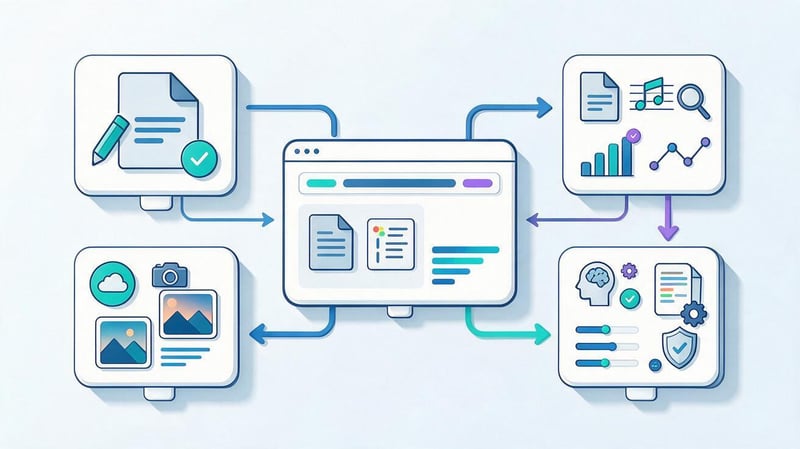
The source indicates who created the material and where the data for publication was obtained. The site may use its own expert materials, user reviews, external research, and information generated using software tools.
When working with any source, consider reliability, copyright, and the ability to verify the source data. Pay particular attention to figures, research, legal information, medical advice, and financial recommendations.
Author's content
Original content is created by a company, editorial staff, or external specialist based on their own expertise and materials. This may include articles, research, photographs, videos, instructions, case studies, test results, and employee commentary.
This approach helps develop topics through real data that cannot be fully replicated using competitors' materials. Personal photographs, work experience, project statistics, and expert explanations enhance the page's informational value and make the content stand out from generic publications.
User-generated content
User-generated content, or UGC, is created by customers and visitors to the platform. It includes reviews, comments, questions, customer photos, discussions, and other materials generated after a person interacts with a product or service.
UGC can provide useful details that a company might not have noticed when preparing its description. Publishing such materials requires moderation, privacy protection, and clear guidelines, especially if the user uploads photos or provides contact information.
Curated content
Curated content is based on the selection, comparison, and systematization of external sources. For example, the editorial team may compile several studies on a single topic, explain the differences in methodologies, and provide links to the original publications.
This type of material requires careful attention to source materials and copyright. Unauthorized copying of text or graphics is prohibited, and citations and statistics should be accompanied by references so readers can verify the context and relevance of the data.
AI-powered content
A neural network can help gather ideas, build a structure, process a dataset, or prepare a draft of a text. However, the final material must be reviewed, as AI can make mistakes in dates, names, numbers, terms, and citations.
Statements that could affect a user's health, financial situation, safety, or legal decisions should be carefully reviewed. An editor and subject matter expert should verify the facts, regardless of how the original text was prepared.
Lead SEO specialist — Gennady
I don't evaluate content by character count. I first look at what question brought the user to the page and what format is easiest for them to get an answer in. Sometimes it's a detailed article, sometimes a table, a video, or a calculator. Semantics are important to understand demand, but good content is created around the user's task, not the number of times a keyword is repeated.
What is digital content?

Digital content is materials created, stored, and distributed electronically. This includes web pages, e-books, photographs, videos, podcasts, online courses, apps, presentations, and other information assets.
A website example clearly illustrates what digital content is: an article is stored as text data, images are uploaded as separate files, videos can be streamed via an external service, and a calculator functions as a software element on the page.
Internet content and online content are often used interchangeably, although digital content is broader and can exist without an internet connection. For example, an e-book or video file remains digital even when stored locally on a device.
Media content typically refers to images, video, audio, and other media formats. Web content encompasses all website content, including text, navigation elements, documents, user data, and interactive elements, if available on the web page.
How does website content differ from content on social media?
Social media content is often designed for quick consumption within a feed, algorithmic recommendations, and regular audience interaction. Website content typically has a longer lifespan, is linked to the resource's navigation, and often receives clicks from search queries.
The degree of control also varies. On its own website, a company manages the page structure, internal links, design, analytics, and technical aspects, while a social network sets its own restrictions on the formats and distribution methods of publications.
| Parameter | Website | Social media |
|---|---|---|
| Lifespan | The materials can work for years | Posts often disappear from the feed quickly |
| Traffic source | Search, links, direct visits | Feed, recommendations, subscriptions |
| Formats | Articles, tables, pages, services | Posts, stories, short videos |
| Control | High level of owner control | Dependence on platform rules |
| The main task | Information search and conversion | Reach, Communication, and Engagement |
Social media content often requires a shorter delivery and a strong visual component. Social media content types also vary by platform, so it's best to develop a comprehensive SMM strategy separately from the content structure of the main website.
What content do different types of websites need?

There's no universal set of materials for all websites because users' needs vary. An online store buyer compares products, a potential agency client studies the terms of service, and a blog reader seeks clarification on a specific issue or practical instructions.
Therefore, website content should be planned after determining the page type and target action. The same content layout rarely works equally well for a catalog, landing page, corporate resource, and informational project.
| Site type | Main content |
|---|---|
| Online store | Categories, cards, prices, photos, specifications, reviews, instructions |
| Services website | Description of services, cost, stages of work, cases, FAQ |
| Corporate website | Company information, services, team, documents, news |
| Blog | articles, studies, instructions, reviews |
| Landing | offer, terms, proof, forms, and CTA |
| Online service | interface, documentation, tips, knowledge base |
Uniform requirements for product cards and categories are especially important for online stores. Online store content includes product names, specifications, photos, availability, prices, descriptions, and additional information necessary for selection and ordering.
A service website requires a different structure. Here, users need a description of the task, the format of the work, the deadline, the price or calculation method, examples of completed projects, and a clear way to contact the company after reviewing the material.
What should quality content be like?
Content quality is determined by how well the material helps the user solve a problem and how accurately it conveys information. Beautiful design doesn't compensate for outdated prices, erroneous specifications, or text that repeats obvious phrases without providing specific details.
When preparing a page, it's important to consider audience, credibility, relevance, structure, and search intent simultaneously. These criteria help evaluate the content of the material, rather than limiting the review to text length or uniqueness percentage.
Useful
Useful content answers a specific question or helps someone complete an action. If someone is searching for delivery options, the information should include cost, delivery times, regions, and restrictions, rather than a long description of the company's benefits without the necessary details.
Usefulness also depends on the audience's level. A beginner will need an explanation of terms and basic steps, while a professional will benefit from precise parameters, documentation, calculation methods, and data that can be used in their work.
Reliable
Factual accuracy is especially important where users make decisions based on figures, timeframes, medical advice, financial terms, or legal requirements. Such information should be verified before publication and re-evaluated whenever the page is updated.
For research, statistics, and regulatory information, it's advisable to cite the original source. This allows readers to verify the data themselves, and provides the editor with a clear basis for future updates without having to research the origin of each figure.
Relevant

Even high-quality content can become outdated over time. Prices change, products are discontinued, services update their interfaces, legislation is revised, and links to external sources become unavailable.
An update should address the page's content if the facts have changed. Simply changing the publication date doesn't make old information current, so when revising, you should check the figures, instructions, images, links, and conclusions.
Clear and structured
It's easier for readers to work with a page when the material is divided into logical sections, with each heading answering a specific question. Tables help compare data, lists are suitable for sequences, and short paragraphs reduce the strain of reading on a phone.
The structure also helps you quickly find the section you need without having to read the entire text sequentially. This is especially useful for long guides, technical documentation, reviews, and commercial pages with numerous terms.
Unique in value
Unique website content should provide its own value, something the user doesn't get from simply retelling competitors' content. This could include company data, real-world examples, original photographs, expert commentary, research results, or practical experience.
Formal text uniqueness merely reflects word matching with other documents and doesn't assess its usefulness. When creating unique content, it's best to start with your own source material and then build a structure and explanation around it for a specific audience.
Matching the search intent
Search intent describes what result a user expects to see after a query. For one keyword, a person might want to get a definition, for another, they might be looking for a product, for a third, they might be comparing services. Therefore, the same page structure will work differently for these cases.
Semantics helps understand demand and related questions, but it shouldn't degenerate into a list of phrases to be mechanically repeated. First, the user's task is defined, then the structure, format, and depth of topic coverage are selected.
Where to get content for the website?

Where to source content depends on the niche and type of page, but the most valuable source is often the company's own information. Experts within the business know product specifications, real customer questions, service limitations, and process details that aren't available in competitors' publicly available materials.
External sources are also useful if they allow you to verify facts, supplement the material with research, or provide context. Before publishing, you should evaluate the origin of the data, date, authorship, and the right to use other people's materials on your website.
Company expertise
Company employees can provide insights that are difficult to obtain through a typical search. Sales understands common objections, support identifies recurring issues, engineers explain technical limitations, and project managers can provide real-world examples.
Such material is conveniently collected through interviews, questionnaires, internal documents, and meeting notes. The copywriter then translates the professional information into understandable language, preserving the accuracy of terminology and factual details.
Customer Questions
Customer inquiries reveal what information the audience truly needs. Questions from calls, chats, comments, emails, and requests often suggest topics for FAQs, new articles, and additions to commercial pages.
If managers receive the same question regularly, it's worth addressing it directly on the website. This helps users get a quicker answer and reduces the number of repeated requests to support or the sales department.
Semantics and search results
The semantic core shows the phrases people use when searching for information. After clustering queries, it's possible to determine the topics of individual pages, related questions, and the approximate depth of each cluster.
Analyzing search results helps you understand which types of pages Google considers relevant to a query. Don't just copy a single competitor; it's more useful to compare multiple documents, find common elements, and identify questions that are poorly covered.
Own research and data
In-house research creates material that is difficult to replicate without access to the original data. This could include customer surveys, project statistics, test results, measurements, comparative experiments, and aggregated company data.
Before publication, it's advisable to explain the data collection methodology. It's important for readers to understand the sample size, study period, and measurement conditions; otherwise, even precise figures may be misinterpreted.
User-generated content
Reviews, questions, photos, and user comments help users see the product through the eyes of real customers. This content often complements the official description with details of use and highlights situations the company didn't consider when creating the page.
Before publishing user-generated content, you must obtain permission if required by the platform's rules or legislation. It's best not to disclose personal information unless absolutely necessary, and any controversial claims should be verified before posting.
External sources
Research, government resources, official documentation, and industry publications help supplement your own expertise. For technical, financial, and legal topics, it's best to prioritize primary sources where the information has been published by the data owner.
Don't automatically paste other people's images, tables, and text onto your website. Before using, please check the license, citation conditions, and copyright notices. If necessary, limit yourself to a link and your own summary of the facts.
Is it possible to take content from neural networks?
A neural network can be used to gather ideas, draft a structure, classify data, and prepare a first draft of a piece. This method speeds up certain stages of the process, but does not eliminate the need for editorial and expert review.
Facts, dates, names, figures, references, and professional claims should be verified with reliable sources. If an AI has fabricated a study or combined information from different documents, the error may appear convincing and go unnoticed without manual verification.
How to create content for a website?

Content creation begins with understanding the page's purpose, not opening a text editor. You need to define your audience, gather queries, study search results, gather source material, and only then move on to text, images, and other formats.
This order reduces the number of revisions and helps distribute information across website pages. When the structure is thought out in advance, the copywriter understands what to disclose in detail, what data to include in a table, and where to place internal links.
Step 1: Determine the Page's Purpose
First, you need to formulate the purpose of a specific URL and what action the user should take after viewing the content. An informational article can explain the topic and lead to related services, while a product card should help compare features and place an order.
The goal should be specific and related to the visitor's real-world scenario. If a page tries to solve too many different problems at once, the content usually becomes overloaded and poorly addresses the primary need.
Step 2: Research your target audience
Different user groups ask different questions, even about the same product. A novice might look for a basic explanation and examples, while an experienced specialist wants to see precise parameters, limitations, methodology, and technical documentation.
Sales, support, analytics, and search demand data are useful for audience analysis. These sources help understand customer language, selection criteria, and concerns that should be addressed on the page before contacting the company.
Step 3. Collect semantics and determine search intent
The semantic core shows demand and related phrases, but queries need to be grouped by meaning before use. Informational, commercial, and navigational keywords often require separate pages because users expect different results.
Clustering makes it easier to identify the primary URL topic and supporting queries. This approach helps avoid cannibalization, when multiple website pages attempt to rank for the same set of queries.
Step 4. Study the search results and competitors
Search results show the types of pages that already answer the query: articles, categories, cards, services, or commercial landing pages. This is an important signal for choosing the format of future material and the depth of topic coverage.
When analyzing competitors, it's worth looking at the title, description, H1-H3, tables, FAQs, images, interactive blocks, and internal links. Then, identify common search results patterns and find information that existing pages are missing.
Step 5: Prepare the structure

Before writing the text, it's helpful to create a framework of H1, H2, H3, and, if necessary, H4. Each section should answer a separate question, and the sequence of blocks should follow the user's logic, from the basic definition to more detailed information.
Structure helps you spot repetitions and unnecessary topics early on. If two adjacent subheadings require the same answer, it's better to combine them before writing than to remove duplicate paragraphs from the finished piece later.
Step 6. Collect source material
Source material includes company data, product specifications, expert commentary, research, statistics, documents, and examples. The more complex the topic, the more important it is to gather this material before the copywriter begins work.
Without source material, a text often turns into a retelling of publicly available information. Proprietary data helps provide specifics that the reader won't find in dozens of similar articles, while also reducing the risk of factual errors.
Step 7. Prepare text and media materials
Once the structure is approved, you can write the text, prepare tables, images, diagrams, and videos. The format is chosen based on the content: a comparison can be conveniently shown in a table, a process in a diagram or video, and a detailed explanation is best left in text.
All page elements should complement each other and work towards a common theme. If an image or table repeats an adjacent paragraph without additional information, that element should be simplified or eliminated.
Step 8. Perform SEO optimization
After preparing the material, check the Title, Description, H1-H3, keyword usage, internal linking, image alt text, and search intent. Optimization should preserve natural language and ensure readability.
Duplicate topics are checked separately with other website URLs. If a similar page already exists, it's sometimes more effective to supplement it or change the semantic distribution than to create a new piece for a nearly identical query.
Step 9. Post content on the website
Publishing involves uploading materials to the CMS, formatting, and configuring tables, images, links, and interactive elements. After publishing, you should test the page on a computer and mobile devices to ensure all elements display correctly.
Particular attention should be paid to links, headings, tables, and large images. Errors at this stage can impair the readability of even high-quality content, so checking the finished page is essential before indexing.
Step 10. Check and update
After publication, content management continues through analytics, Search Console, and user feedback. This data shows which queries trigger the page, which sections are read, and where visitors encounter information gaps.
Updates may include new examples, current prices, additional questions, link corrections, and structural revisions. The frequency depends on the topic: a stable reference requires less frequent review than a page with rapidly changing conditions.
Who is responsible for the site's content?

Website content management is typically divided among several specialists. On a small project, one person may handle several roles, while on a larger team, copywriting, SEO, design, editing, and technical hosting are handled by different employees.
This division helps maintain quality at every stage. The copywriter is responsible for the text, an expert verifies the facts, an SEO specialist monitors search intent, and a content manager ensures the correct placement of materials on the website.
Copywriter
A copywriter prepares the text based on its structure and source material, adapting the material to the audience level and the page's purpose. They are responsible for clear wording, logical transitions, examples, and a consistent presentation of the topic without repetition.
For complex niches, a copywriter works alongside a subject-matter specialist. This collaboration helps maintain precise terminology and avoid situations where a well-written text contains professional errors or misrepresents the product.
Content Manager
A content manager posts and updates content through the CMS, working with text, images, tables, product cards, and other website elements. Depending on the project, they may also perform basic editing and check page design.
A content manager is often responsible for ensuring regular publications and data accuracy. With a large catalog, this role is especially important, as it requires monitoring specifications, prices, photos, and consistent formatting across hundreds or thousands of cards.
SEO specialist
An SEO specialist analyzes search demand, competitors, and search results structure, then determines page requirements. They help distribute semantics across URLs, prepare the heading structure, and select internal links.
After publication, a specialist checks the page's indexing, rankings, search queries, and organic search performance. Based on the analysis, the structure or content may be adjusted if the material does not fully address the main intent.
Editor and subject matter expert
An editor checks the logic, style, repetitions, structure, and clarity of the material, while a subject matter expert ensures professional accuracy. In complex topics, it's advisable to separate these roles, as a well-written text may contain an industry-specific error that goes unnoticed by the editor.
The expert also helps supplement the material with real-life examples and practical details. Such comments make the page more useful, especially when open sources provide overly general or contradictory information.
Designer, photographer and videographer
The designer is responsible for the graphic presentation of information, the photographer creates original images, and the videographer helps show processes and objects in motion. These specialists are involved where the visual format provides additional information to the user.
Their work should be based on the page's content and the site's overall design system. Beautiful visuals without a meaningful connection to the topic take up space but don't help the reader understand the product or solve the problem.
Common Mistakes When Working with Content

Errors most often occur when a publication is considered separately from the user's task and the site structure. This results in pages containing identical text, duplicate keywords, outdated data, and images added for design rather than to convey information.
Before publishing, it's helpful to check your content against several criteria: does it meet the intent, does it contain specific data, is the structure clear, are the facts relevant, and is each section truly relevant to the reader?
Writing text only for the sake of keywords
Mechanical repetition of semantics makes the text cumbersome and often creates unnatural constructions. Search queries are needed to understand the topic and demand, not to literally transfer each wording into several adjacent sentences.
If the keyword can't be inserted grammatically, it's better to use a normal word form or a similar construction. The page's primary purpose remains the same: to provide the user with a clear and concise answer on the chosen topic.
Copying competitors' materials
Copying someone else's text doesn't add any value to a website and creates copyright risks. Even extensive rewriting remains a weak solution if the source material and structure are identical to the original.
While analyzing competitors is useful for understanding search results, it's better to base your final content on your own expertise, data, and examples. These are the elements that differentiate your page from dozens of similar publications.
Publish unverified AI content
Neural network text can appear reliable even if it contains factual errors, so publishing without verification poses a risk to both the reader and the website owner. Fictitious studies, references, medical recommendations, and financial figures are particularly dangerous.
AI should be viewed as an auxiliary tool within the editorial process. The final version should be reviewed by a human who can assess the facts, terminology, and consistency with the company's actual product.
Use text only
Some topics are difficult to explain in paragraphs alone. Comparing multiple pricing plans is easier in a table, a sequence of steps is quicker to grasp from a diagram, and a product's appearance is best illustrated with a photo or video.
Before adding a new block, it's worth asking which format will provide the fastest and most accurate response. This approach helps reduce unnecessary text and make the page more accessible to users with different reading styles.
Do not update outdated materials
Outdated information reduces the value of a page, even if the original text was high-quality. Users may receive an incorrect price, outdated instructions, or a link to a service that has already updated its interface.
For important pages, it's important to establish a review frequency and assign a responsible person. When updating, the entire content should be reviewed, rather than simply changing the date at the top of the article.
Mix different search intents
A single page is rarely capable of equally well addressing completely different needs. For example, queries about what content is, a search for a content manager job, and a question about phone storage contents all relate to different user scenarios.
It's best to organize such clusters into separate URLs if they have independent demand. This makes the site structure clearer and helps each page focus on a specific informational or commercial purpose.
Website content includes all the information and functional materials that a user interacts with on a page. Text, images, videos, tables, and interactive elements work best when each format is tailored to a specific task and helps users get an answer without unnecessary interaction.
Before creating content, you need to define the intent, gather data, study search results, and prepare the page structure. After publication, the material should be verified using analytics data and updated as facts, product information, or demand change.
If your website requires systematic content development, start by analyzing existing pages and their semantics. Seo-Gen will help you determine what materials need to be created, which pages need to be reworked, and how to structure the content to meet search engine demand and business objectives.


