What is included in on-site SEO optimization?


On-site website optimization encompasses all work performed directly on the website itself and its pages. This includes technical settings, section structure, semantics, meta tags, content, internal linking, images, loading speed, mobile version, and microdata. All these elements influence how search engines perceive the website and how user-friendly it is.
Work usually begins with a technical audit. There's no point in rewriting texts and tweaking meta tags if the page you need is blocked from indexing, has an incorrect canonical, or competes with another URL on the site for the same query. Once these issues are resolved, they move on to structure, semantics, landing page optimization, and internal linking.
On-site SEO optimization continues even after the initial setup. New pages appear on the website, product offerings change, services are updated, redirects and duplicates appear, and some old content becomes irrelevant. Therefore, the site's health should be periodically monitored using Google Search Console, crawlers, and analytics systems.
On-Page SEO: What is it?
On-page SEO is the optimization of website elements and individual pages that the website owner can directly manage. The term is often used synonymously with on-site SEO optimization, although in practice, on-page SEO is usually closely related to technical SEO. Users searching for “on-page SEO what is it” most often want to understand the specific scope of work and its impact on search engine optimization.
On-Page SEO includes page content, Title, Description, H1-H6, URL, images, internal links, search intent compliance, and some technical parameters. A comprehensive approach also includes checking crawling, indexing, canonical, robots.txt, sitemap.xml, page loading speed, and mobile performance.
Optimization is built around a specific URL and its purpose. If a page is created for a commercial query, it must match that commercial intent. An informational query requires content that thoroughly answers the question and helps the user understand the topic.
How is on-page optimization different from technical SEO?
Technical SEO is part of the overall on-page optimization system and is responsible for ensuring the website functions correctly from a search engine robot's perspective. It checks page accessibility, server response codes, redirects, canonical, robots.txt, sitemap.xml, loading speed, mobile version, URL parameter handling, and other technical settings.
Internal optimization covers a broader range of tasks. In addition to the technical aspects, the specialist analyzes the semantic core, website structure, page content, meta tags, headings, images, internal linking, and the relevance of each URL to search intent.
For example, fixing a 301 redirect chain is technical SEO, while reworking H1 tags and text structure is on-page SEO. Checking internal links covers several areas at once, as links affect navigation, internal link weight distribution, and page accessibility for search engines.
How is On-Page SEO different from Off-Page SEO?
The difference depends on where the work is performed. On-Page SEO is performed on the website itself: a specialist can change the page, structure, content, internal links, or technical settings. Off-Page SEO works with external signals generated outside the website.
| Parameter | On-Page SEO | Off-Page SEO |
|---|---|---|
| Where the work is taking place | On your own website | On third-party resources |
| Main tasks | Technical aspects, content, structure, meta tags, interlinking | Links, brand mentions, digital PR |
| Degree of control | Most changes can be implemented independently | The result partly depends on external platforms |
| Order | Performed during the preparation and development of the website | Added after basic preparation of landing pages |
In practice, both approaches complement each other. Link promotion directs users and search signals to specific URLs, so these pages must be technically accessible, relevant to queries, and well-connected to the rest of the site's structure.
Answers to your questions
What is included in internal website optimization?
On-page optimization includes a technical audit, indexing control, website structure, semantic core, meta tags, headings, content, images, internal linking, mobile version, speed, and appropriate micro-markup. The specific scope of work depends on the type of website, the number of pages, and the errors found.
The work is carried out in a specific sequence, as technical limitations may hinder subsequent optimization. Accessibility and target URLs are checked first, then content and structural development are addressed.
What is On-Page SEO?
On-Page SEO is working with elements of your website and individual pages that affect how search engines understand your content and how users experience it. This includes structure, text, title, description, H1-H6, URLs, images, and internal links.
In practice, on-page SEO is closely linked to technical optimization. Therefore, a comprehensive approach also includes checking indexing, canonical, speed, mobile version, and other page parameters.
Where to start with internal website optimization?
It's best to start with an SEO audit and indexation check of your main pages. A specialist will identify target URLs and analyze HTTP codes, robots.txt, sitemaps, canonicals, redirects, and potential duplicates.
After this, the semantic core is compiled or updated, clusters are distributed across pages, and critical technical errors are corrected. Only then do they move on to the mass optimization of text, meta tags, and internal linking.
How often should you perform on-page SEO optimization?
A comprehensive audit is conducted before active promotion, after major website changes, and whenever noticeable issues with organic traffic arise. The frequency of regular monitoring depends on the size of the project and the speed at which new pages are added.
Websites with frequent releases require more constant monitoring. For a small corporate website, periodic checks and a separate audit after major changes to the structure or CMS are sufficient.
Does internal optimization affect website rankings?
On-page optimization helps search engines discover, index, and correctly interpret landing pages. It also improves content relevance to queries and simplifies the user experience.
A specific ranking depends on competition, page quality, external signals, intent, and other factors. Therefore, simply fixing the title, increasing page speed, or adding Schema.org cannot be considered a guarantee of a specific search ranking.
How is on-page SEO different from off-page SEO?
Internal optimization is performed on your own website and covers its technical condition, structure, content, meta tags, and internal links. The project owner has direct control over most of these changes.
Off-page optimization involves links, brand mentions, publications, and other signals from third-party resources. It's typically developed after the main landing pages have been prepared and critical on-page errors have been addressed.
What's more important: technical SEO or content?
The technical condition and content of a page serve different purposes, so they should be considered together. Search engines require an accessible and correctly configured URL, while users require content that meets their needs.
A technically sound page with weak content may be inferior to a more useful result. Good content also loses search potential if the URL is blocked from indexing, incorrectly canonicalized, or inaccessible to robots.
What is included in on-site SEO optimization?

The answer to the question “what is included in on-page website optimization” depends on the size and type of project, but the basic scope of work remains similar. First, the technical condition of the resource is checked, then the semantics and structure, after which individual landing pages are optimized and the internal links between them are built.
Comprehensive internal website optimization typically includes a technical SEO audit, indexing control, duplicate content management, semantic keyword collection, query clustering, meta tag preparation, content improvement, image optimization, cross-linking, a mobile version, and appropriate micro-markup.
This order helps identify the root cause of the problem. For example, a decrease in traffic to a category may be related to the page's content, but first, you need to rule out noindex, incorrect canonical, redirect, or competing URLs.
Technical optimization
The technical aspects are checked before major content changes are made. The search robot must receive a correct server response, load the page, see the main content, determine the canonical URL, and determine whether the page is allowed for crawling and indexing.
The check is typically performed by a crawler along with Google Search Console data and server information. On large sites, additional analysis is performed on logs, URL parameters, pagination, filters, JavaScript rendering, and technical page generation rules.
The technical audit should result in a list of specific, prioritized issues. Critical errors affecting the accessibility and indexing of landing pages are corrected before minor issues.
Indexing and page accessibility
First, you need to determine which URLs the search engine should index. Commercial categories, services, articles, and other landing pages are typically open for indexing, while service search results, some filters, technical parameters, and duplicates may be closed.
Each URL is checked for its HTTP code, meta robots, X-Robots-Tag, canonical, and robots.txt accessibility. A page that is considered searchable should typically return a valid 200 response and contain indexable primary content.
Google Search Console helps you see which pages have been discovered, crawled, and indexed. Just because a URL appears in reports or a sitemap doesn't mean the search engine will necessarily add it to search results.
Robots.txt and Sitemap.xml
Robots.txt defines crawling rules for search engine bots. It can be used to restrict crawling of specific technical sections, but it shouldn't be used as a universal way to remove a page from the search index.
A sitemap.xml contains a list of priority URLs that the website owner wants to submit to search engines for discovery. It's recommended that the sitemap include canonical pages with correct server responses intended for indexing.
If a sitemap contains redirects, 404s, closed URLs, or non-canonical versions of pages, search engines receive conflicting signals. Therefore, it's important to check the sitemap after major structural changes and regularly monitor large projects.
Duplicates, canonicals, and redirects
Duplicates occur when identical or nearly identical content is available at multiple URLs. Causes include GET parameters, filters, different slash variants, HTTP and HTTPS, www and non-www, sorting, pagination, or CMS features.
Canonical indicates the preferred version of a page among similar URLs. It is used as a signal to search engines, but does not replace a redirect in situations where the old page should permanently lead to a new address.
A 301 redirect is used when URLs change permanently, merging pages, or restructuring a site. After implementation, it's worth checking for any redirect chains or loops, and it's best to immediately update internal links to the final URL.
Human-readable URLs
A page's address should help people understand its place in the site's structure and content. Short, consistent URLs are easier to verify, share, and maintain, especially when a project contains hundreds of categories, services, or informational materials.
It's best to avoid random identifiers and parameters in URLs unless they're required by the site's logic. The words in the URL should match the page's content, and the directory structure should reflect a clear and consistent hierarchy.
When changing already indexed URLs, consider the implications of the migration. Mass URL changes unnecessarily create additional redirects and can temporarily complicate search engine crawling.
Loading Speed and Core Web Vitals
Speed affects page usability and is part of the technical assessment of a website's quality. It's worth checking actual loading times, server performance, image size, the number of heavy scripts, styles, and page behavior after the main content appears.
Core Web Vitals includes LCP, INP, and CLS metrics. They help evaluate the speed of primary content appearance, interface responsiveness, and visual stability of elements during loading.
A high PageSpeed score alone doesn't guarantee ranking gains. Speed optimization should address specific issues, such as slow loading times at the first screen, delays during interaction, and element jumps that interfere with user reading or clicking.
Mobile version
Google uses the mobile version of a website when processing and evaluating pages, so key content should be accessible to both the user and the search engine on a smartphone. Hiding important content exclusively in the desktop version is undesirable.
During testing, they look at font size, spacing between clickable elements, horizontal scrolling, menus, forms, tables, images, and speed. The user should be able to perform basic actions without zooming in on the page or constantly correcting accidental clicks.
For a responsive website, it's best to maintain the same semantic structure and metadata across devices. Mobile elements that load via JavaScript or appear only after interaction are checked separately.
Schema.org micro-markup
Structured data helps search engines more accurately determine the entity type and individual page properties. Markup is added only where it corresponds to the actual content and the selected type is appropriate for a specific section of the site.
Organization, LocalBusiness, BreadcrumbList, Article, BlogPosting, Product, and other Schema.org types can be used for different pages. FAQPage is used based on current search engine requirements and only for questions with answers that actually appear on the page.
JSON-LD cannot contain fictitious ratings, reviews, prices, or features that don't exist on the website. After implementation, the markup is checked by a validator to ensure that the data in the code is consistent with the information visible to the user.
Semantics and website structure
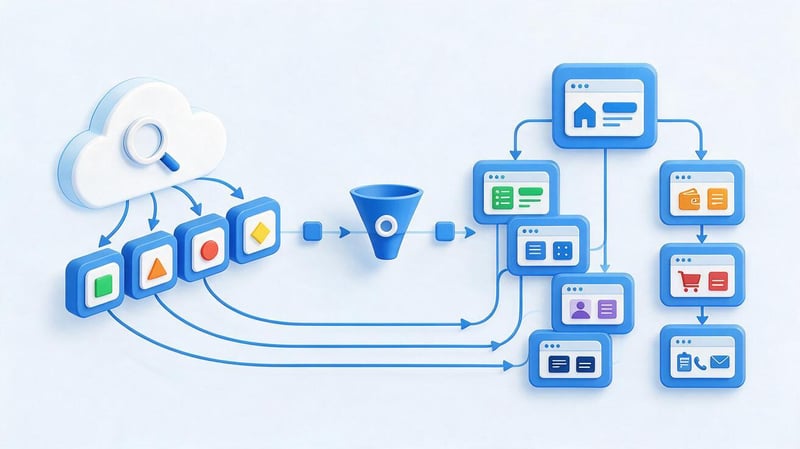
The semantic core shows what tasks users formulate through search and what pages are needed to answer this demand. Based on semantics, a specialist determines landing page types, distributes queries among them, and verifies the completeness of the existing structure.
The work begins with an analysis of the intent and search results. Two similarly worded queries may lead to the same page if Google returns the same set of results, or they may require different URLs if the intent is significantly different.
Once queries are distributed, the structure becomes clearer for SEO, the content team, and developers. Each important page has a purpose, a main cluster, and links to adjacent sections.
Collection and clustering of search queries
Semantics are collected from several sources: search engine data, query analysis services, Search Console, competitors, and the site's own structure. Irrelevant phrases are then removed and the remaining queries are combined by intent and similarity of search results.
Clustering helps us understand which phrases relate to the same user need. For example, the queries “on-page website optimization what is included” and “what is included in on-page website optimization” logically fit on a single page, since their intent is virtually identical.
There's no need to create a separate URL for each word form. The page should fully address a group of related queries and naturally utilize variations of them within the structure and text.
Relevance map
A relevance map captures the relationship between queries and target pages. In the simple version, you only need to specify the cluster, search intent, URL, page type, primary keyword, Title, and H1.
This table helps you quickly see which queries already have a landing page, where there are gaps, and which URLs are potentially competing. For large projects, the indexing status, priority, rankings, and internal links are also indicated.
The map should be updated after creating new sections or significant changes to the semantics. This ensures that the copywriter, SEO specialist, and developer are working within the same structural logic and avoid creating duplicate pages independently.
Query cannibalization
Cannibalization occurs when multiple website pages compete for the same search intent and the search engine regularly changes the relevant URL. This situation often occurs after the mass creation of similar services, tags, articles, or filter pages.
The problem is identified based on search results, Search Console, and the rankings and content of competing URLs. The mere fact of using the same keyword on multiple pages does not confirm cannibalization if the pages solve different user problems.
Depending on the situation, pages are merged, semantics are redistributed, internal links are strengthened, or content is changed. Redirects and canonicals are used when they meet the technical requirements, not as a universal solution to address query overlap.
Content optimization

Content should answer a specific search query and be appropriate for the page type. Informational content requires explanations, details, and practical recommendations, while a service page should explain the terms, process, benefits, limitations, and contact information.
The number of characters alone doesn't determine the quality of a page. Length depends on the topic, the intent, and how much information the user needs to make a decision or receive a complete answer.
When updating an existing text, you first need to understand which questions remain unanswered and which sections truly help to develop the topic. Mechanically expanding the text usually creates repetition and reduces readability.
Search intent matching
Intent indicates the task a user wants to solve after entering a query. One person is looking for a definition of a term, another is comparing services, and a third is ready to submit a request, so a single structure doesn't work for all queries.
The optimization logic is sequential: query → intent → page type → structure → content. If the search results for a query are filled with detailed articles, a short commercial page may be less likely to meet audience expectations.
Before preparing the text, it's worth examining the page types in search results, recurring semantic blocks, and additional user questions. Then, create a structure that covers the topic without copying competitors or artificially adding unnecessary sections.
Completeness and usefulness of content
Comprehensive material addresses the user's primary questions on the topic. This is achieved through the use of definitions, instructions, examples, tables, comparisons, checklists, and expert explanations where they truly facilitate understanding.
There's no need to repeat every block found in competitors' content. If the information isn't relevant to the page's intent or duplicates something already covered, it adds bulk without adding value.
It's worth reviewing your text regularly after publication. Search Console shows new queries and pages with high impressions, and visitor behavior helps identify sections where people lack an answer or a clear next step.
E-E-A-T and trust
For expert topics, it's helpful to show who prepared the material and what experience the recommendations are based on. The page can include the author, position, professional specialization, publication date, and the date of the last substantive update.
Trust is enhanced by real-world case studies, proprietary data, specific examples, and links to primary sources. Company information, contact information, and a transparent description of services help users verify who is responsible for the published material.
E-E-A-T can't be replaced by a single technical tag or author's signature. Trust is built on the quality of the text itself, the resource's reputation, verifiable expertise, and the consistency of information across the site's pages.
Title, Description, and H1–H6 headings
Meta tags and headings help convey the topic of a page to search engines and users. They should be relevant to the actual content and not promise information that isn't found elsewhere in the text.
Keywords are used naturally, without repeating the same phrase across all page elements. For each indexed URL, it's advisable to prepare its own Title, Description, and H1 tag, taking into account its intent.
When generating meta tags in bulk, it's important to check templates for duplicates and errors. This problem is especially common in online stores, catalogs, and projects with a large number of geographic pages.
Title
The title briefly describes the page and is often used by search engines when forming the search results' title. It's a good idea to place the main query closer to the beginning if this structure sounds natural and accurately reflects the content.
The tag should differentiate between similar pages on the site. Listing multiple keywords separated by commas hinders readability and rarely helps the user understand how a particular result differs from its neighbors.
Google may change the displayed title in search results if it deems other page text more appropriate. Therefore, the purpose of the Title is to accurately describe the page, not to mechanically pin one snippet option.
Description
The description briefly tells the user what they'll find on the page. It can include key semantics, specific characteristics of the content, and a clear reason to click through from the search results.
Identical descriptions for dozens of pages reduce their informativeness. Priority categories, services, and articles are best provided with separate descriptions that match the content of a specific URL.
Search engines sometimes generate snippets from other text fragments, especially when they more accurately address a specific query. Therefore, the description should be viewed as a prepared description of the page, not as guaranteed search results.
H1–H6
The H1 tag defines the main topic of the page and should match its search intent. For most standard pages, a single, clear H1 tag is sufficient, followed by the content being divided into logical sections using H2, H3, and, if necessary, H4.
Headings help users quickly scan the material and find the desired section. Their order should reflect the hierarchy of meanings, not be used to change the font size or place additional keywords.
If a heading is phrased as a question, it should be written like a normal question and end with a question mark. This format works well for sections that directly answer a common user query.
Image optimization

Images affect page speed, visual perception, and content accessibility. Before uploading, choose an appropriate file size and avoid sending the browser a photo several thousand pixels wide if it's displayed as a small block.
The alt attribute describes the content of a significant image and helps in situations where the image doesn't load or the page is being used by a screen reader. The alt text should describe the image and not repeat a set of search queries.
For large images, use modern formats, compression, and lazy loading where lazy loading doesn't interfere with the first screen. It's advisable to set element sizes in advance to prevent the page from changing block layout while loading.
Internal linking
Internal links connect pages into a unified structure and help search engines find new URLs. These links allow users to access related services, categories, or content without having to return to the main menu.
It's best to build links based on meaning. An article about on-page optimization can link to separate materials about technical SEO audits, semantic cores, meta tags, microdata, and off-page SEO.
The anchor text should explain where the link leads. Phrases like “click here” are sometimes appropriate in the interface, but in content-heavy text, the specific title of the related topic is usually more helpful.
Contextual links
Contextual links are placed within the text where the linked page helps further the topic. This transition feels natural, as the user accesses additional material precisely when the relevant question arises.
Don't turn every paragraph into a series of links. For a single page, it's better to select a few truly related topics and distribute them throughout the content without repeating the same anchor text every few sentences.
When updating old content, it's worth checking whether new pages have appeared that make sense to link to. This helps you more quickly incorporate new URLs into the site structure and maintain thematic connections within a section.
Breadcrumbs and navigation
Breadcrumbs show a page's position within the site hierarchy and provide users with a quick path to the parent section. For search engines, they also help them understand the relationships between structural levels.
Menus, categories, and navigation blocks should lead to truly important pages. If a commercial URL exists but is only accessible via a sitemap or direct link, the site structure requires revision.
It's best to design navigation equally for both users and search engines. Relevant links should be present in accessible markup and work well on mobile devices.
Orphan pages
An orphan page is a URL without internal incoming links from other indexed pages on the site. A search engine may discover it through a sitemap or external link, but such a page remains poorly integrated into the overall structure.
For important commercial and informational URLs, it's worth finding logical sources of internal links. These could be categories, articles, breadcrumbs, related content blocks, or contextual mentions.
Nesting depth also needs to be monitored. If an important page requires multiple navigation levels, it's worth reviewing the architecture and determining whether a shorter, more logical path could be provided.
Lead SEO specialist — Gennady
I don't start internal optimization by rewriting the title tag or adding keywords. I first determine which page Google should show for a specific cluster of queries and whether the robot can crawl and index it properly. If there's an error in canonical, indexing, or semantic distribution, working on the text often starts too early. Once technical conflicts are resolved, I can then improve the page's relevance and internal linking.
Stages of internal website optimization
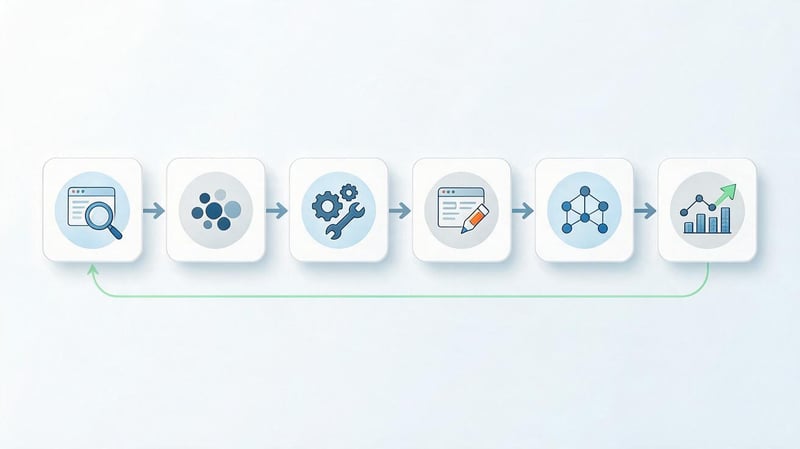
It's best to perform the stages of on-page website optimization in a sequential manner, preventing early decisions from having to be redone after technical issues are discovered. The first step is an audit, followed by semantic distribution and correction of critical errors.
After technical preparation, they move on to optimizing landing pages, internal links, and microdata. The cycle concludes with implementation testing and data monitoring after a second search engine crawl.
The process diagram looks like this:
Audit → Semantics → Technical Fixes → Page Optimization → Interlinking and Schema.org → Results Monitoring
Each step can be performed multiple times. After launching new sections or changing the structure, some checks are repeated to ensure new URLs don't create duplicates or conflicts with existing pages.
Step 1: Conduct an SEO audit
An audit shows the current state of a website and helps determine the next steps. It checks indexing, HTTP codes, robots.txt, sitemap, canonical, redirects, duplicates, structure, meta tags, content, internal links, mobile version, and speed.
It's advisable to categorize errors by impact and implementation complexity. For example, an accidental noindex on a key category requires immediate correction, while an imperfect image description can wait until the next round of work.
After the audit, the developer and SEO specialist should receive a specific list of tasks. The phrase “improve technical SEO” is useless without a URL, a description of the problem, the expected result, and a verification method.
Step 2: Collect and distribute semantics
After a basic technical check, queries are collected and grouped into clusters. For each cluster, the intent and a suitable landing page are determined, and then the required URL is verified to exist within the current site structure.
Semantic distribution prevents situations where multiple materials are independently optimized for the same query. New pages are pre-defined with a purpose, primary cluster, Title, H1, and their position within the internal structure.
When working with an existing website, semantics also reveals redundant pages. If two URLs completely duplicate a user's task and offer no independent value, they should be considered for merging.
Step 3: Fix critical technical errors

The first errors to be fixed are those that interfere with crawling, indexing, or the correct selection of the target URL. These include incorrect response codes, indexing restrictions, conflicting canonicals, redirect loops, and serious accessibility issues.
Next, they check the sitemap, robots.txt, duplicates, parameters, and other system issues. On large sites, a single template error can affect thousands of pages, so these tasks are usually given high priority.
After implementation, the site must be rescanned. The code change is considered complete only after checking the actual page response, the resulting HTML markup, and the URL behavior in the browser.
Step 4: Optimize Landing Pages
For each priority URL, we check intent match, title, description, H1, H2-H4 structure, content, images, and internal links. Semantics are distributed naturally, without repeating the same phrase in each heading.
Commercial pages should disclose the terms of a service or product, while informational pages should fully answer questions. If a page's type conflicts with search results, editing meta tags alone usually won't solve the problem.
After updating a page, it's helpful to compare it with related URLs on your own site. This helps you spot overlapping topics early and avoid further cannibalization.
Step 5. Set up internal linking and micro-markup
Once landing pages are prepared, they are linked to relevant content and sections. Links are added from content, navigation, breadcrumbs, and topic blocks if such transitions are truly useful to the user.
Appropriate Schema.org types are also checked. Structured data must accurately match the page content, so a single microdata template cannot be applied to all URL types without verification.
After implementation, the links are crawled, and the JSON-LD is validated. This helps identify incorrect URLs, closed pages, and markup errors before the search engine crawls them again.
Step 6. Check the result and track changes
After implementing on-page optimization, the monitoring phase begins. Google Search Console is used to monitor indexing, impressions, clicks, queries, and changes to relevant pages, while GA4 helps evaluate user behavior and conversions.
Rankings should be monitored alongside search queries and URLs. If another website address is growing, a specialist checks for cannibalization and whether internal links are distributed correctly.
Changes are evaluated over a sufficient period of time, taking into account the site's crawl frequency and scale. At the same time, technical monitoring continues, as new releases may reintroduce previously fixed bugs.
Internal Website Optimization: A Checklist

An on-page website optimization checklist typically begins with accessibility and indexing issues. This is followed by a review of the page structure, content, navigation, and technical display quality across different devices.
The checklist is convenient for regular monitoring after the development of new features or major updates. It can be adapted to the type of project, as online stores, corporate websites, and information portals all face different technical risks.
| Check block | What to check |
|---|---|
| Indexing | Landing pages are accessible to the robot and do not contain random noindex |
| HTTP codes | Working URLs return 200, deleted and moved pages are processed correctly |
| Robots.txt | The rules do not block resources and pages required for searching |
| Sitemap.xml | The map contains current canonical URLs intended for indexing |
| Canonical | There are no conflicting or incorrect canonical URLs on the pages |
| Redirects | No cycles, long chains or internal links to old addresses |
| URL | The addresses are clear, consistent and do not create unnecessary duplication |
| Title | Main pages have unique and relevant titles |
| Description | Descriptions match the content of priority pages |
| H1–H6 | Headings reflect the structure and search intent |
| Content | The material solves the user's problem without artificial bulk |
| Semantics | Clusters are distributed among target URLs |
| Interlinking | Important pages have internal incoming links |
| Images | The sizes are optimized, important images have correct alt |
| Mobile | Basic actions can be easily performed from a smartphone |
| Speed | Load, LCP, INP and CLS checked |
| Schema.org | Suitable types with real data are used |
| Analytics | Google Search Console and GA4 collect the necessary data |
It's advisable to complete the check with a re-crawl of the site. This will ensure that the fixes actually work in the final version of the page, and aren't just present in the developer's task.
Common Mistakes in On-Page SEO Optimization
Most internal SEO problems arise from uncoordinated changes. Content is added without a relevance map, a developer changes URLs without a redirect map, and new templates automatically create duplicate meta tags or technical pages.
Therefore, errors should be looked for at the system-wide level, not at the individual URL level. If a single issue is repeated across hundreds of pages, it's better to fix the template or generation rule than to edit each page manually.
Optimizing a page for keywords only
Text built around repetition of a keyword may formally contain the desired semantics while still answering the user poorly. Search intent requires addressing the user's task, not a set percentage of repetitions.
Keywords are best used where they help clearly define a topic, section, or object. The remaining vocabulary emerges naturally as the question is explored in more detail.
Before publishing, it's more useful to check the completeness, structure, and relevance of the answer to the query than to count every occurrence of the primary keyword. Density remains a diagnostic indicator, not an independent optimization goal.
Same Title and Description on different pages
Duplicate meta tags often arise from CMS templates or the mass creation of similar pages. They make it difficult to distinguish between URLs and usually indicate a broader issue with semantic distribution.
First, you need to determine the purpose of each page, then prepare separate Title and H1 tags. The description should also be adapted to the content of priority URLs, especially for commercial pages.
If it's practically impossible to differentiate two pages by meaning, simply replacing a few words in meta tags won't solve the problem. In this case, you need to check whether both pages are truly needed in the structure.
Multiple pages for one search intent
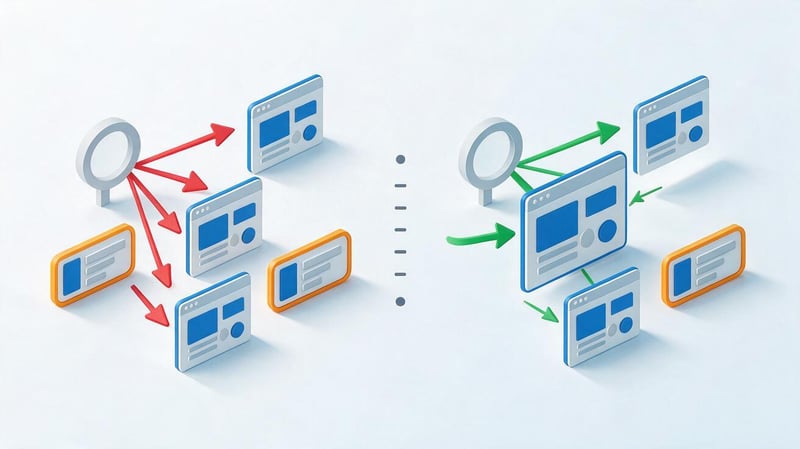
When multiple URLs address the same user task, search engines may periodically change the relevant page. This results in rankings and impressions being distributed across multiple URLs, and internal linking further increases confusion.
First, compare the search results and page content, then determine the primary landing page. The remaining URLs can be reworked for a different intent, merged, or redirected if a particular page is no longer needed.
The decision is made based on the specific structure of the site. Automatically setting canonical tags on all similar pages or blocking them from indexing without analysis is not recommended.
Robots, canonical, and noindex errors
One incorrect directive can exclude an important page from the index or send a contradictory signal to the search engine. Such issues are especially dangerous after redesigns, migrations, and transferring settings from a testing environment.
Priority pages are checked using the actual HTML and HTTP headers. It's important to ensure that meta robots, X-Robots-Tag, and canonical tags comply with the expected logic.
After fixing the issue, it's a good idea to request a re-check through Search Console and rescan the site. This helps ensure the error hasn't persisted in another template or language version.
Lack of internal linking
Even a useful page can remain virtually isolated if it's not linked to internally. This problem often occurs with older articles, new services, and pages created separately from the main navigation.
Links should be added from relevant sections, not random pages with high internal weight. The anchor text should explain the topic of the link and fit naturally into the sentence.
After setting up interlinking, the crawler will show the new page depth and the number of incoming internal links. This data is useful for further development of the structure.
Optimization for the desktop version only
A page can look great on a large monitor but still be difficult for a mobile user. Problems often arise with tables, forms, menus, pop-ups, and buttons placed too close together.
The mobile version should be tested on the actual screen size and with a standard internet connection. Particular attention should be paid to the first screen, navigation, and elements that the user is expected to tap.
The main content must remain accessible on a mobile device. If important sections disappear or load only after a complex interaction, a separate technical review is required.
Uncontrolled page generation
Automatically generating thousands of URLs based on cities, tags, filters, or keyword variations quickly increases a website's size. Without dedicated intent, many pages end up with nearly identical content and begin competing with each other.
Before scaling, you need to test demand and search results for future page types. The new URL should solve a distinct user problem and have its own data or content value.
Template generation is useful where the structure truly scales. However, meta tags, canonical tags, internal links, sitemaps, and indexability should be controlled at the template level.
When should internal optimization be repeated?

A full technical audit is typically conducted before starting SEO, after a major website redesign, and when organic traffic noticeably changes. Regular monitoring is needed more frequently, especially for projects that constantly introduce new products, articles, filters, and services.
A re-check is required after changing the CMS, domain, URL structure, redesign, or major migration. In such cases, redirects, canonicals, robots.txt, sitemaps, hreflang, internal links, and the integrity of indexed content are monitored especially carefully.
Large websites benefit from ongoing technical monitoring. An error in the overall template can affect thousands of pages simultaneously, so it's best to detect it soon after the release rather than after a significant drop in search traffic.
The content is also reviewed. Old articles are updated as facts and tools change, commercial pages are updated with new terms, and semantics are adjusted based on new queries and specific search intent.
Is it possible to do on-page SEO optimization yourself?
A small website can be independently checked using a basic checklist. The owner can find empty title tags, check indexing via Google Search Console, correct page content, add internal links, and optimize images.
Complexity grows rapidly with the number of URLs. Online stores, multilingual sites, marketplaces, and large information projects require working with filters, pagination, canonical, hreflang, JavaScript, mass redirects, and metadata generation rules.
The main risk of self-optimization is associated with large-scale technical changes. An error in robots.txt, the canonical template, or the redirect map can affect an entire section, so it's advisable to test such changes on a limited sample first.
If a system check is needed, you can order an SEO audit. A specialist will identify critical issues, divide tasks between SEO, content, and development, and establish an implementation order that can be reviewed after the release.
On-site SEO optimization begins with technical accessibility and proper targeting. Work then moves to semantics, structure, meta tags, content, images, internal links, and regular change monitoring.
For a small website, you can run a basic checklist yourself. If the project contains hundreds or thousands of URLs, multiple languages, filters, a complex structure, or regularly changing templates, it's better to systematically search for technical errors through an SEO audit.
Seo-Gen conducts an internal website audit, identifies priority issues, and prepares specific tasks for the developer, content team, and SEO specialist. To get started, submit your website address for analysis – after review, we'll determine which changes are most needed and where they will yield practical results.


