Mobile app promotion tools


After an app is published in the App Store or Google Play, users rarely discover it themselves. Hundreds of competitors are already operating in popular categories, ad placements take up a significant portion of search results, and the decision to install it takes a few seconds. Even a high-quality product can remain unnoticed for a long time without proper promotion.
ASO, advertising, SEO, content marketing, review management, and recommendations are used to attract audiences. Each approach has its own objectives, costs, and methods for measuring results. Some tools help identify search queries, others attract installs, and still others show what users do after the first launch.
It's best to choose services based on the state of the app itself. A new product primarily needs a clear store card, basic analytics, and initial data on audience behavior. An app with consistent installs already benefits from attribution systems, competitor analysis, and advertising campaign automation.
Let's explore the main mobile app promotion tools, their capabilities, and limitations. We'll compare popular services and consider which tools are best suited for different stages of product development.
What tasks do mobile app promotion tools solve?
Promotion begins with understanding your audience and the problem your app solves. Before launching ads, you need to find out what search queries potential customers are using, what products they compare your offer to, and what's stopping them from installing your app.
To do this, they use research services, app store analytics, and search engine data. After launch, other questions arise: which sources generate high-quality installs, why users delete the app, and how much money the acquired audience generates.
Different categories of tools address specific stages of this process. Therefore, the task is defined first, and then services with the necessary features and suitable usage conditions are selected.
Main directions of mobile app promotion
App promotion tools can be categorized by their primary purpose. This separation helps avoid situations where a team pays for multiple platforms but still struggles to measure results.
Main areas of work:
- Market research. Analysis of competing apps, categories, search demand, audience interests, and prospects for entering new markets.
- ASO optimization. Improving app visibility in the store, selecting keywords, working with metadata, screenshots, ratings, and install conversion.
- Paid acquisition. Launching advertising campaigns, selecting audiences, testing ads, and managing user acquisition costs.
- SEO and content marketing. Attracting organic traffic from Google through your app website, articles, reviews, and relevant pages.
- Analytics and attribution. Measuring installations, registrations, purchases, user activity, and the contribution of individual advertising sources.
- Audience retention. Bringing users back through notifications, personalized offers, and improved product engagement.
Each area is interconnected. For example, optimizing the app's card can improve the conversion of ad traffic into installs. And analytics data helps determine which ads attract people who are truly interested in the product.
What tools are needed at different stages of app development?
Before publishing an app, it's best to research competitors, assess demand, and test product positioning. ASO services, search query analytics, and built-in store tools are all suitable for these tasks. If the app is still in development, you'll also need to test registration, initial user scenarios, and analytics events.
After publication, the priority usually shifts to search visibility and initial installs. The team monitors app rankings, reviews, checks card conversion rates, and runs small ad tests. At this stage, it's better to focus on a few clear metrics than to create dozens of reports without the ability to use the resulting data.
Once a product begins to consistently attract an audience, the importance of advertising attribution, retention, and revenue increases. Platforms like AppsFlyer or Adjust, along with advanced analytics, communications automation, and tools for managing multiple advertising channels, are useful here.
Answers to your questions
What tools are used to promote mobile apps?
Mobile app promotion utilizes ASO services, advertising accounts, analytics platforms, and user communication tools. Each category addresses a specific objective: demand research, increased visibility, attracting installs, or audience retention.
For example, AppTweak helps manage search queries, Google Ads is used for advertising, and Firebase is used for analyzing in-app events. AppsFlyer and Adjust are used to measure mobile advertising campaigns.
For a small team, a few basic solutions are often sufficient. As the product grows, the toolkit is expanded to accommodate new challenges and the available budget.
What is the best tool to use to promote an app on Google Play?
The choice depends on the task and the current state of the app. If you need to improve the card and study conversion, you can start with the Google Play Console and built-in testing tools.
For keyword and competitor research, specialized ASO services, including AppTweak, MobileAction, or Asodesk, are suitable. They help find relevant queries and track changes in search visibility.
If you need to quickly attract an additional audience, consider Google Ads with appropriate goals. To evaluate results, you'll need to analyze installs and user actions after the initial launch.
What free tools are there for app promotion?
Basic tasks can be accomplished through App Store Connect and Google Play Console within developer accounts. These dashboards provide features for managing app cards, analyzing installs, reviews, and specific engagement metrics.
For app analytics, you can use the free Firebase features, and for website promotion, you can use Google Search Console and Google Analytics. Some specialized services also offer trial periods or limited access options.
It's important to note that ad impressions and installations typically require a separate budget. Free registration on an advertising platform doesn't mean free user acquisition.
How do ASO tools differ from mobile app advertising services?
ASO tools help analyze search queries, track rankings, and improve app store listings. They are used to improve organic visibility and conversion rates for users already interacting with the App Store or Google Play.
Advertising platforms are designed for purchasing placements and attracting audiences through paid channels. They provide budget settings, target actions, advertising materials, and accessible campaign metrics.
Both approaches can work simultaneously. For example, a well-designed app card is helpful for ad conversions, while advertising campaign data helps better understand the interests of the target audience.
How to evaluate the effectiveness of app promotion tools?
Evaluation begins with product goals. If the primary objective is sales, it's necessary to track the purchase price, the number of paying customers, and the revenue generated by the acquired audience.
For additional analysis, CPI, CPA, conversion, retention rate, LTV, and ROAS are used. These metrics help compare costs, user quality, and the results of individual channels.
Data should be examined over comparable periods, taking into account attribution limitations and differences between platforms. A single metric rarely provides a complete picture, so final decisions are made based on several related metrics.
Is it possible to promote a mobile app without paid advertising?
The app can be promoted through ASO, SEO, publications in relevant media, your own blog, and user recommendations. These channels help attract an audience without constantly purchasing ad impressions.
Organic promotion requires a high-quality app profile, relevant search queries, and content that appeals to potential users. Additionally, managing reviews and improving the user experience are helpful.
Organic methods require time and consistent work. Growth rate depends on competition, demand, product quality, and team capacity, so it's impossible to guarantee a specific number of installs in advance.
Do I need to use different tools for the App Store and Google Play?
Separate dashboards are used to manage publishing and built-in analytics: App Store Connect for Apple apps and Google Play Console for Android products. Their functions and measurement methods differ.
Some specialized platforms support both platforms. For example, ASO services allow you to analyze queries and positions for iOS and Android, and mobile attribution systems can work with advertising campaigns on both platforms.
Even when using a shared service, it's still necessary to analyze individual stores separately. Audience search behavior, card requirements, and measurement features can vary even within a single app.
ASO tools for promotion in the App Store and Google Play
App Store Optimization (ASO) is responsible for an app's search visibility and the quality of its presentation in the store. A user enters a search query, sees a list of results, opens several cards, and selects a suitable product. At each stage, the app competes for attention with other offers.
ASO involves analyzing the app's semantic core, selecting relevant keywords, and working with the app's title, description, graphics, and localization. Special attention is paid to the app's page conversion rate: a high ranking loses some of its value if visitors rarely proceed to install.
The App Store and Google Play algorithms differ, so optimization results need to be analyzed separately. ASO tools help systematize your efforts, but they don't guarantee specific rankings or the number of organic installs.
Built-in App Store Connect and Google Play Console tools
Getting started with ASO is easy through the developer dashboards. These dashboards contain information about your app's profile, publications, user ratings, and store interactions. This data allows you to check basic metrics without purchasing a separate research platform.
Built-in solutions have limitations. They primarily display information about their own app, while detailed competitive intelligence and broad keyword research often require additional services.
App Store Connect is designed for managing apps in the Apple ecosystem, while Google Play Console is used to manage Android apps on Google Play. If a product is available on both platforms, data must be compared, taking into account differences in measurement methodologies.
App Store Connect for iOS app optimization
App Store Connect helps manage app publishing and presentation on the App Store. Developers can update metadata, manage localizations, explore analytics, and monitor available user engagement metrics.
The App Analytics section displays data on views, downloads, conversions, and other user actions. This helps determine which sources are attracting audiences and which card changes may be related to promotion results.
Product Page Optimization is available for design testing. It allows you to compare variations of individual graphic elements of the card, including icons, screenshots, and previews. Results are evaluated after a sufficient amount of data has been accumulated.
Another option is Custom Product Pages. These are additional versions of the app's landing page that can be tailored to a specific audience or advertising campaign. For example, a financial app might have one page dedicated to expense tracking, while another one focuses on transfers and payments.
Such pages are useful when promoting multiple features of a single product. However, the developer must consider Apple's publishing requirements, feature availability, and analytics reporting limitations.
Google Play Console for Android app promotion
The Google Play Console provides data on your app's presence in the store, installs, conversions, ratings, and technical health. You can use the dashboard to manage text, images, localizations, and individual app store listing variations.
Store Listing Experiments are used to test hypotheses. The team can test different graphic materials or text elements and see how these changes impact target metrics. Implementing several significant changes simultaneously is undesirable, as it makes it more difficult to determine the impact of a specific element.
Custom Store Listings help tailor your app's presentation to different audiences. For example, a user arriving from a specific ad campaign might see a design tailored to their interests and expectations.
The console also provides information on user ratings, reviews, and technical issues. If your app frequently crashes or receives negative reviews after an update, this should be taken into account when assessing your ASO results.
Google Play Console data is useful for working with your own product, but for a systematic study of competitors, it is usually supplemented by specialized platforms.
Keyword and competitor research services

Specialized ASO tools simplify search query research in the App Store and Google Play. They help you discover new keywords, track app rankings, study competitors, and evaluate visibility changes after updates.
AppTweak is suitable for semantic research, position monitoring, and competitive analysis. The service is used for preparing metadata, studying search queries, and comparing apps in individual countries.
Sensor Tower is focused on mobile market and competitive research. Its capabilities are useful for teams that need to study categories, demand trends, product visibility, and competitor valuations.
MobileAction offers ASO analytics and competitive app research tools. The platform helps monitor changes in search visibility and study queries related to specific products.
Asodesk is used for keyword selection, ranking tracking, and ASO. The specific plan's capabilities should be verified before purchasing, as access to research and additional features may vary.
When working with such services, it's convenient to start with a small group of competitors. For example, for a foreign language learning app, you can gather your direct competitors, identify their key queries, and find topics that aren't well-covered in your profile.
Queries are then checked for relevance to the app's features and user expectations. High search interest doesn't necessarily mean a keyword is suitable for a specific product. Language, country, and audience search behavior patterns should also be considered.
Install and revenue metrics for other apps, as reported by third-party platforms, are often calculated using models. These should be used as benchmarks for comparative analysis, while maintaining a distinction between estimated data and the actual results of your own app.
Rating and review optimization tools
Reviews help us understand the difficulties users encounter after installing the app. They can reveal registration errors, inconvenient navigation, payment issues, and features that the audience is missing.
To manage feedback, they use built-in store dashboards and specialized services. For example, AppFollow offers features for monitoring ratings, analyzing reviews, and organizing responses to users. This is useful for products with a large number of ratings and multiple language versions.
Reviews should be regularly grouped by topic. If users start complaining about authorization after an app update, the issue should be escalated to the developers, and then checked to see if the number of such reports has changed after the fix.
Additionally, you can analyze ratings for individual app versions and changes in overall product perception. This information helps connect user feedback to specific technical and product decisions.
Rating manipulation, buying fake reviews, and artificially inflating installs violate app store policies. Such actions can lead to penalties, so reputation management should be based on genuine ratings and improving the user experience.
Paid mobile app promotion tools
Paid advertising helps attract users while your app's organic visibility is still limited. It's also useful when launching new features, expanding to new countries, and promoting seasonal offers. Results depend on the quality of the app, the selected audience, advertising materials, and conversion measurement settings.
Before launching advertising campaigns, it's important to define the target action. For one product, a first install is sufficient, for another, a registration is more important, and for a third, a paid subscription or a completed order is more important. The difference between these goals directly impacts advertising settings and performance evaluation.
Paid app promotion requires constant cost monitoring. If the advertising system is optimized solely for installs, it may find users who quickly download the product but rarely perform useful actions.
Google Ads for mobile app advertising
Google Ads offers App Campaigns to attract new users and drive in-app actions. Campaigns can use different ad placements across Google services and partner infrastructure depending on the campaign type and available features.
When setting up, the advertiser selects the app, promotion countries, budget, and target action. The system uses the submitted content and available signals to find users who are most likely to complete the selected conversion.
For a new app, you can start by optimizing for installs if you don't yet have enough data on your audience's subsequent actions. Once you've accumulated some statistics, it's a good idea to test campaigns focused on registration, order placement, or purchase.
The work involves using text elements, images, videos, and other advertising creatives. Their content must align with the app's capabilities, otherwise users will install the product with expectations it doesn't meet.
It's best to evaluate such campaigns using data from your advertising account and app analytics. If the cost per install decreases but the number of paying customers remains the same, the change doesn't necessarily improve the economics of the promotion.
Apple Ads for App Store promotion
Apple Ads is used to advertise apps within the App Store. Previously, the platform was widely known as Apple Search Ads, which Apple changed to Apple Ads in April 2025.
One of the main scenarios is displaying ads based on search queries. The user enters the name of the desired category or function, after which they can see a relevant ad among the search results.
The platform also supports other placements within the App Store, including the Today and Search tabs, as well as specific app pages. Availability of specific formats depends on the market, product category, and Apple's terms and conditions.
When working with search advertising, consider the relevance of queries, bid settings, and the quality of the app's product page. If the advertised page poorly explains the product's purpose, purchasing additional traffic may result in unnecessary expenses.
For specific campaigns, you can use customized Custom Product Pages. For example, an ad for a budget tracking feature could link to a page where this feature is specifically shown in the first screenshots.
Apple Ads is especially interesting for companies that promote iOS apps and want to reach people directly while they're searching for a product in the App Store.
Meta Ads and TikTok Ads
Meta Ads are used for advertising on Facebook and Instagram, while TikTok Ads are used for TikTok placements. These platforms are suitable for apps whose benefits can be clearly demonstrated through an image, a short video, or a user flow demonstration.
For example, a photo editing app could be promoted by showing a before-and-after comparison of the results. A trip planning service could be promoted by videos showing route creation and saving useful information.
Advertising accounts allow you to manage target audiences, budgets, creatives, and campaign metrics. Measuring in-app actions may require SDK integration, analytics integration, or the use of a partner attribution platform.
When testing, it's helpful to separate changes to your audience and your ad assets. If you change your video, ad copy, and campaign settings all at once, it can be difficult to understand why your metrics have changed.
It's important to consider platform requirements for advertising materials and restrictions for specific categories. For example, financial and medical products may require additional review of advertising content and compliance with platform rules.
After launch, you should monitor registrations, purchases, and user retention. A high number of video views or clicks alone doesn't indicate how useful the acquired audience was.
Advertising networks and in-app advertising
In-app advertising involves placing ads within other mobile apps. Users may see ads while playing games, viewing content, or interacting with a service that supports ad monetization.
Well-known players in this market include InMobi and AppLovin. Ad networks offer different formats, traffic purchasing models, available markets, and campaign optimization methods.
Before connecting to the network, you need to find out where ads can be displayed and what restrictions apply to the advertised category. It's also helpful to check the availability of reports on traffic sources, geography, and the quality of acquired users.
Advertising fraud requires special attention. This includes invalid installations and actions that distort campaign statistics. Advertising platform data, analytics events, and specialized anti-fraud features are used to check suspicious sources.
A low cost per install may seem attractive, but the final decision is best made after analyzing audience behavior. If users delete the app almost immediately or fail to register, the advertising channel requires further review.
SEO and organic app promotion tools
Users don't exclusively search for mobile apps in stores. Many start with Google when trying to solve a specific problem: tracking expenses, keeping track of orders, learning a language, or editing photos.
Here, SEO promotion of the app through your own website is useful. Landing pages and articles can answer search queries, explain product features, and direct visitors to the App Store or Google Play.
The website is also suitable for detailed instructions, feature comparisons, and publishing materials that don't fit on the app's profile. However, organic promotion requires time, high-quality content, and a technically sound website.
SEO promotion of a mobile app website
To start, the app needs a clear landing page. It should explain the product's purpose, showcase its key features, include real screenshots, and provide installation links for supported platforms.
Next, they collect Google search queries related to user tasks. For example, a family budgeting app could be promoted through content on spending planning, setting financial goals, and tracking recurring payments.
When researching, it's important to distinguish between informational and commercial queries. Someone looking for budgeting guidance may become interested in an app after reading helpful information. A user searching for a specific app typically expects to see the product itself and the option to install it.
For SEO, Google Search Console, Google Analytics, and keyword research services are used. They help evaluate search visibility, clicks, visitor behavior, and the performance of individual pages.
Technical preparation of the website is also necessary: correct Title and Description, headings, indexing, internal linking, mobile adaptation, and high loading speed. For pages with different language versions, hreflang and canonical tags should be additionally configured.
Content marketing, PR, and working with bloggers
Content marketing is especially useful for products that need to explain complex features or build trust with the audience. Companies can publish instructions, comparison materials, answers to user questions, and examples of how to use the app in everyday situations.
For example, a small business app might publish articles on order tracking, customer service, and sales management. Readers get solutions to their problems while also learning about the product's capabilities.
PR and publications in specialized media outlets help reach audiences beyond your own website. For such materials, the appropriate topic of the platform, reader interest, and the reliability of the information presented are crucial.
Collaborating with bloggers is suitable for apps whose work can be easily demonstrated in practice. Before publishing, it's important to research the author's audience, the quality of their subscribers' interactions, and the terms of advertising integration.
Referral programs can be a separate channel. Users recommend the app to their friends, and the company tracks clicks and registrations through special links. Rewards should be tied to legitimate referral actions, without encouraging fake installs or ratings.
Deep links and transitions from website to app
After familiarizing themselves with the product, users should be able to easily navigate to the desired action. If they click on an ad for a specific feature, and the app opens to the home screen without a clear path forward, some interested users may be lost.
Deep linking is used to solve this problem. These links direct the user to a specific screen or content within the app. Depending on the platform and implementation method, the link may open the app or the corresponding website page.
In the Apple ecosystem, Universal Links are used for verified transitions, while in Android, Android App Links are used. In both cases, the developer must configure the app's association with the domain and verify that it handles supported URLs.
For example, a user might navigate from a trip planning article directly to a saved itinerary within the app. If the product isn't yet installed, a clear flow to the website or store will be required.
For some advertising scenarios, link management systems are used, including OneLink from AppsFlyer. They help organize clicks and link them to ad source measurements within available attribution mechanisms.
After setting up the link, it's important to test it on real devices. Important factors include behavior with and without the app installed, screen transitions, browser performance, and campaign settings retention.
Tools for analytics and evaluation of promotion effectiveness
The number of installs is convenient for reporting, but it's not a sufficient metric for managing marketing costs. Two advertising channels can generate the same number of users, who then interact with the app in completely different ways.
For a comprehensive assessment, data on registrations, purchases, repeat launches, and retention is necessary. It's also helpful to understand where people first encountered the product and what advertising interactions preceded the target action.
Mobile app analytics is based on events sent from the product to the analytics system. These events should be defined in advance so that after campaigns are launched, the team can compare results without constantly changing the measurement methodology.
Firebase and Google Analytics for Mobile Apps
Firebase provides developers with a suite of services for working with mobile products, including integration with Google Analytics. Using analytics events, you can study user activity and record actions that are important for your business.
For an online store, such events might include product viewing, adding to cart, initiating checkout, and purchasing. For a subscription-based app, it's useful to track registration, trial start, paid membership, and renewal.
The collected data helps build conversion funnels and identify stages where users abandon interaction. For example, if a significant portion of the audience opens the registration form but rarely completes it, it's necessary to check the form's usability and any potential technical errors.
Google Analytics also helps compare user groups and study repeat actions. For analysis, it's important to consider data processing consents, privacy settings, and the specific features of available reports.
When connecting Firebase, it's important to agree on event names between developers and marketers. If one team passes a purchase event called purchase, and another creates its own version for a similar action, the data may not be comparable.
AppsFlyer and Adjust for Install Attribution
When an app is promoted across multiple advertising systems, the question of distributing results across sources arises. Data from different advertising accounts may differ due to attribution models, conversion windows, and measurement limitations.
AppsFlyer and Adjust help collect information about mobile advertising campaigns and link it to available data on installs and user actions. These platforms are in demand when working with multiple acquisition channels.
They can also provide traffic quality analysis and suspicious activity detection. Specific capabilities depend on the enabled integrations, pricing plan, and technical configuration of the app.
Before choosing a system, it's helpful to determine which advertising platforms need to be connected and what data should be included in the reports. Support for the required platforms, data storage policies, and compliance with privacy requirements are checked separately.
What are MMP platforms used for?
MMP stands for Mobile Measurement Partner. This is the name given to platforms that help measure mobile advertising results and manage attribution within the available technical frameworks.
For example, an app is advertised through Google Ads, Meta Ads, and a third-party network. MMP can help compare campaign-related installs, registrations, and purchases based on the selected measurement model.
To ensure proper operation, you need to enable the SDK or supported integration, configure events, and test data transfer. Special attention is paid to purchase events, repeat actions, and advertising campaign parameters.
The MMP platform is useful for teams that regularly purchase traffic and need a unified methodology for comparing advertising sources. For small volumes, it's possible to first evaluate the capabilities of built-in analytics and the need for additional spending.
It's important to note that attribution depends on available data and platform rules. Reports don't always allow for a definitive reconstruction of a specific user's entire path to installation.
How to take into account the peculiarities of iOS and Android?
Operating systems take different approaches to privacy and advertising data sharing. Therefore, the same advertising campaign may be measured differently for iOS and Android users.
iOS has restrictions related to access to advertising identifiers and user permissions. For certain measurement scenarios, the SKAdNetwork and AdAttributionKit mechanisms are used, which provide special rules for transmitting advertising performance information.
Android also has requirements for user data and advertising identifiers. The ability to obtain certain information depends on device settings, permissions, and the platform's existing mechanisms.
When comparing advertising channels, it's important to check the attribution methodology, available events, and measurement windows. Differences between your advertising account and MMP don't always indicate a technical error.
For reporting, it's advisable to identify the primary data source for each indicator in advance. This will help the team understand which figures are used for budget management and which are needed for further analysis.
What performance indicators should you track?

The set of metrics depends on the app model. For a free product with ad monetization, user activity and retention are important. For a subscription service, conversion to payment, renewals, and revenue per user are more important.
The analysis uses several metrics that describe different parts of the user journey:
| Metrics | What does it show? | Why is it needed? | Where to track |
|---|---|---|---|
| CPI | Cost of one installation | Compare installation acquisition costs | Google Ads, Apple Ads, MMP |
| CPA | Cost per target action | Measure registrations, purchases, and other conversions | Advertising, MMP, analytics |
| CAC | Customer acquisition cost | Compare expenses with the number of new customers | CRM and marketing reporting |
| CR | Conversion rate | Find weak points in the user journey | App analytics |
| Retention Rate | The percentage of users who returned during the selected period | Assess audience retention | Firebase, MMP |
| LTV | User value over the whole interaction period | Assess the potential profitability of acquisition | Product analytics |
| ROAS | Advertising revenue to expenditure ratio | Compare return on advertising costs | Advertising, MMP, BI |
| DAU and MAU | Daily and monthly active users | Track the size of your active audience | Firebase, product analytics |
These metrics need to be analyzed together. For example, a decrease in CPI may be accompanied by an increase in the proportion of users who stop opening the app after the first day.
A hypothetical example of comparing advertising channels
The company spent 20,000 UAH on each of the two advertising channels. The first channel generated 1,000 installs, the second 500. In terms of the number of users attracted, the first channel appears more attractive.
However, after installation, 20 users of the first channel and 40 users of the second subscribed to a paid subscription. The picture is as follows:
| Indicator | Channel A | Channel B |
|---|---|---|
| Expenses | 20,000 UAH | 20,000 UAH |
| Installations | 1,000 | 500 |
| CPI | 20 UAH | 40 UAH |
| Paid subscriptions | 20 | 40 |
| CPA subscriptions | 1,000 UAH | 500 UAH |
The second channel attracted half as many installs, but the cost per paid subscription was half as low. If the company's goal is to attract paying customers, the second option deserves more attention.
The final decision must take into account subscriber lifetime, chargebacks, renewals, and the adequacy of statistics.
Lead SEO specialist — Gennady
When I evaluate mobile app promotion tools, I first define the task each service is designed to solve. ASO helps find relevant queries and improve visibility in the store, advertising analytics shows the cost of acquisition, and user behavior data helps evaluate traffic quality.
I recommend first setting up measurement of key actions, then checking organic demand and the state of the app profile. After that, it's easier to test advertising channels and understand which expenses are truly helping the product grow. If installs are growing, but registrations and purchases remain the same, the cause should be looked for in audience quality or the user journey.
User retention and re-engagement tools
After installation, a person may use an app once and never return. The reasons can vary: inconvenient registration, unclear features, technical errors, or the lack of a regular need for the product.
Product analytics, user feedback, and communication tools are used to analyze retention. The team's goal is to understand why users are ceasing engagement and what changes can improve the situation.
Re-engagement should be tailored to the user's interests and frequency of interaction with the app. Too many notifications often cause irritation and can lead to users turning them off.
Push notifications and email communications
Push notifications help remind users of useful events within an app. For example, a financial service might notify them of an upcoming recurring payment, or a delivery app might notify them of an order status change.
Firebase Cloud Messaging, OneSignal, and other suitable services are used to organize notifications. They allow you to manage message sending, segment your audience, and track engagement metrics.
Segmentation is especially useful for products with different user scenarios. A new user might need a tip on setting up the app, while a returning customer might need a notification about a feature they've previously shown interest in.
Email communications are suitable for more detailed messages, instructions, and information about product changes. They should be aligned with user preferences and personal data laws.
The effectiveness of communications is best assessed by the actions taken after a message is sent. Opening a notification indicates interest, but subsequent purchases, repeat sessions, and retention help understand its practical value.
Behavior analytics and user experience improvement
Retention rates are often tied to app usability. If a user struggles to find a feature after signing up, spending more on advertising won't solve the problem.
To identify bottlenecks, they analyze events, user funnels, technical errors, and support requests. The team can see at what stage users most often abandon an action and which devices are experiencing issues.
For example, after an app update, the number of completed orders decreased, although traffic remained stable. Analytics may show that users are abandoning the app more often at the payment stage, which would require testing the payment flow.
It's also useful to compare the behavior of new and existing users. They may have different expectations, familiarity with the interface, and reasons for ceasing activity.
It's best to test interface changes using data rather than relying solely on the team's personal preferences. After fixing the issue, it's important to verify that the metrics have actually changed and that no new errors have appeared.
Comparison of popular mobile app promotion tools
When choosing a platform, consider its core specialization. A keyword research service may be well-suited for ASO, but it won't provide full-fledged advertising attribution. Similarly, an advertising account doesn't replace product analytics or a review management system.
Below are some common app promotion services and their associated tasks. This comparison helps you determine which tools are worth exploring in more detail before committing.
| Tool | The main task | Platform | Free features | Who is it suitable for? |
|---|---|---|---|---|
| App Store Connect | Card management and store analytics | iOS | Features within a developer account | For iOS app developers |
| Google Play Console | Publishing, ASO, and Store Analytics | Android | Features within a developer account | For Android app developers |
| AppTweak | Semantics, positions, competitive analytics | iOS, Android | Access conditions depend on the offer | For ASO specialists |
| Sensor Tower | Mobile app market research | iOS, Android | Access depends on the product and plan | For analysts and marketing teams |
| MobileAction | ASO and competitive analysis | iOS, Android | Terms and conditions are specified by the service | ASO teams |
| Asodesk | Keywords, positions, and ASO analytics | iOS, Android | Features depend on the plan | For ASO specialists |
| AppFollow | Monitoring reviews and ratings | iOS, Android | Check current conditions | Support and marketers |
| Google Ads | Paid app advertising | iOS, Android | Work with the account, the advertising budget is paid | For performance marketers |
| Apple Ads | Advertising within the App Store | iOS | Advertising placements are paid | iOS Product Teams |
| Meta Ads | Advertising on Facebook and Instagram | iOS, Android | Creating an account does not mean free traffic | For marketers |
| AppsFlyer | Advertising Attribution and Measurement | iOS, Android | Conditions depend on current plans | Mobile Marketing Teams |
| Adjust | Mobile Attribution and Analytics | iOS, Android | Check commercial terms | Products with multiple advertising channels |
| Firebase | Analytics and development services | iOS, Android | There are free features with limitations | For developers and analysts |
| OneSignal | Push notifications and communications | iOS, Android | Availability of features depends on the plan | Product teams |
Some platforms offer demo access or select free features. However, before choosing, be sure to review the current terms, limitations on the number of applications, users, events, and available reports.
Comparing tools solely by monthly cost is inconvenient. One service may cover several team tasks, while another will require additional integration and payment for individual features.
It's also useful to estimate the labor costs involved in setting up the platform. If using the platform requires developer involvement, SDK configuration, and analytics event verification, these efforts should be factored into your budget.
How to choose a tool for mobile app promotion?
When choosing a tool, it's best to start with a specific problem. If users rarely find the app through app store search, consider ASO. If ads drive installs but don't generate purchases, analytics and audience quality become a priority.
Next, they evaluate available resources: advertising budget, number of specialists, technical capabilities, and product development plans. A service with a large feature set may prove inconvenient for a small team that only needs a few reports.
Before making a payment, it's a good idea to check the support for the required stores and countries, the ability to export data, the availability of integrations, and the terms of plan changes.
Selecting tools based on promotion goals
To increase search visibility, you need tools for query research, position monitoring, and product page optimization. These include AppTweak, Asodesk, MobileAction, and store analytics.
If the goal is to attract installs, the team selects advertising platforms with suitable placements. It's also a good idea to determine the acceptable cost per action in advance and verify the analytics' readiness.
Built-in A/B tests in App Store Connect and Google Play Console are useful for increasing card conversion. They help compare product presentation options when there's enough data to draw a reasonable conclusion.
If retention is the primary issue, event analytics, error reporting, and user communication tools will be needed. In this situation, increasing the advertising budget without improving the user journey can lead to additional costs.
An application often requires multiple tools simultaneously. In this case, it's best to prioritize tasks, starting with the issues that most significantly limit the outcome.
Free and paid app promotion tools
For the initial stages of promotion, you don't need to purchase all available services. App Store Connect and Google Play Console already include features for card management, analytics, and hypothesis testing.
Firebase can cover a significant portion of basic event analytics needs. Google Search Console helps manage app website visibility in search, and Google Analytics helps analyze visitor traffic and actions.
Paid tools are often needed for advanced research, attribution across multiple ad networks, process automation, and working with large volumes of data.
However, free access to the advertising account does not mean free impressions or installations. The advertising budget is paid separately, and the cost of traffic depends on many factors, including audience and competition.
When choosing a paid mobile app promotion tool, it's helpful to create a list of features your team actually plans to use. This helps avoid paying an expensive plan for features you won't need yet.
How to choose a set of tools to fit your budget?

For a new app with limited resources, built-in store dashboards and basic analytics are usually sufficient. The main tasks are to test the product card, study demand, collect initial user data, and prepare the product for audience acquisition.
In the next step, you can connect a single specialized ASO service or conduct limited semantic research. If you launch advertising, you'll need to set up install and event measurement, as well as monitor the cost of acquisition.
For an app with regular advertising campaigns, the set expands. The need arises for channel comparison, attribution, retention analysis, and more detailed conversion assessment.
Large products operating in multiple markets often require extensive competitor research, dedicated mobile attribution, analytics automation, and localization management.
Even with a large budget, it's helpful to avoid duplicating functions. For example, several services may simultaneously collect app ranking data, but use different sources and calculation methods. Before renewing subscriptions, evaluate what data the team actually uses to make decisions.
A step-by-step plan for launching a mobile app promotion
It's more convenient to launch promotion sequentially, so that each stage provides data for the next. First, you need to understand the market and prepare the app, then set up results measurement and test acquisition channels.
After the initial campaigns, you can compare the cost per install, user activity, and conversion rates. This information helps you adjust your advertising materials, improve your app's profile, and gradually increase your spending on appropriate channels.
This procedure reduces the risk of a situation where the marketing budget has already been spent, and the team cannot explain the results obtained.
Step 1: Research the market and competitors
The research begins with defining the target audience and the main tasks the app solves. It's important to understand which features users consider important and which alternative products already offer similar capabilities.
Next, they compile a list of direct competitors in the App Store and Google Play. For each app, they examine its name, description, screenshots, ratings, reviews, localizations, and available search queries.
It's also useful to compare product strengths. For example, one competitor might emphasize ease of use, another the number of features, and a third the subscription price.
The data obtained helps formulate the advantages of the app and select the initial semantics. At this stage, the target countries and languages in which the product can fully serve users are also determined.
Step 2: Prepare an app card and analytics
Before launching an ad, it's important to check your app's product page. The title, description, and graphics should clearly explain the product's purpose, and the links and installation buttons should work correctly.
For ASO, relevant queries are selected and distributed across available fields, taking into account the requirements of a specific store. Screenshots should preferably be based on key user tasks, rather than overloaded with interface images without explanation.
Analytical events are set up simultaneously. The minimum set depends on the business model, but typically includes the initial launch, registration, key action, and payment, if applicable.
After integration, it's necessary to verify that events are being received correctly, are not duplicated, and contain the required parameters. If a separate attribution system is used, its settings should also be verified before advertising costs are initiated.
Step 3. Launch test acquisition channels
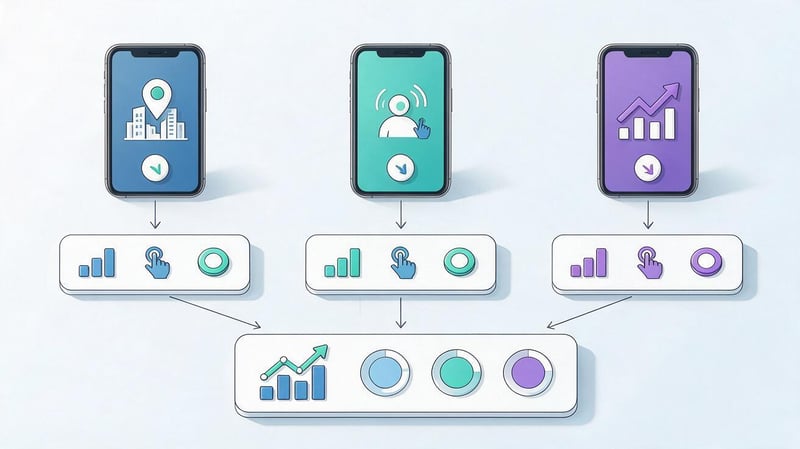
Once prepared, you can launch limited advertising tests while simultaneously developing organic channels. The goal of the initial campaigns is to gather data on audience response, acquisition costs, and the quality of user interactions.
For advertising, you should prepare several creative options with different emphases. For example, one highlights the speed of task completion, another the ease of use of the interface, and a third the specific result of using the app.
It's helpful to define the analysis period and metrics by which the team will compare results in advance. Changing settings too frequently can make it difficult to evaluate an advertising campaign.
At the same time, you can publish content on the website, improve the app's profile, and collect feedback. These actions help gradually expand organic visibility and identify new areas for promotion.
Step 4: Compare channel performance
Once you've accumulated sufficient statistics, you need to compare the results of your advertising sources. You can start by assessing the cost of installations and registrations, then move on to purchases, retention, and other important actions.
It's advisable to analyze metrics over comparable periods and take into account audience differences. For example, an advertising campaign in one country may have different traffic costs and conversion rates than a similar campaign in another region.
The time between app installation and purchase should also be considered. For some products, the user makes the payment decision immediately, while for others, the process takes several days or weeks.
Don't shut down a source just because of one bad day. First, check the data volume, measurement stability, changes to advertising conditions, and any potential technical issues.
Step 5. Optimize and scale your promotion
Once the results of the initial tests become clear, budget allocation can be adjusted. Channels with a suitable cost per action receive more attention, while weak campaigns require a review of the audience, creatives, or settings.
It's best to scale up your promotions gradually. A sharp increase in spending can impact your acquisition costs and audience quality, so re-analyze your metrics after each significant change.
At the same time, ASO continues: updating semantics, checking rankings, working with reviews, and testing app card elements. If the product is entering a new market, it's important to consider the language and user expectations.
Retention is analyzed separately. Increasing installs is more beneficial when the app continues to solve users' problems and they return regularly.
Common mistakes when choosing promotion tools
One of the common problems in mobile marketing is choosing a service based on popularity or the number of advertised features. Companies integrate multiple platforms but don't determine what decisions to make based on their data.
Another mistake involves launching ads without proper analytics. Campaigns begin attracting installs, but the team has no idea how many users register, make purchases, or return to the app.
When planning your promotion, it's worth considering the following mistakes:
- Focusing solely on installations. The number of downloads does not reveal the quality of the attracted audience, so it is necessary to track further user actions.
- Lack of measurement of key events. Without accurate analytics, it is impossible to reliably compare advertising channels based on business results.
- Ignoring ASO. A weak app card can reduce conversion even with good quality advertising traffic.
- Using multiple similar services. Duplicate functions increase costs and complicate reporting.
- Insufficient attention to retention. If users quickly lose interest, constantly increasing the advertising budget rarely solves the problem.
- Buying artificial installations and reviews. Such actions create the risk of sanctions from the stores and distort the picture of real demand.
- Lack of verification of technical integrations. SDK, event, or link errors can result in incomplete data and incorrect decisions.
Another problem arises when copying competitors' advertising strategies without considering the specifics of your own product. Even apps in the same category can vary greatly in terms of audience, monetization, and decision-making time.
Regularly testing marketing hypotheses helps reduce errors. For each change, it's important to define the expected outcome, the measurement method, and a sufficient observation period.
Mobile app promotion tools should be selected based on specific objectives: demand research, visibility improvement, install acquisition, analytics, and user retention. You can start with the built-in capabilities of App Store Connect, Google Play Console, and basic analytics, gradually incorporating specialized services.
If your app needs additional organic traffic from Google, it's important to check your website, search queries, landing pages, and clicks through to the app stores. Contact Seo-Gen for an SEO analysis of your project and recommendations for organic promotion.


