An example of a website's semantic core


A ready-made semantic core helps understand what queries users enter into Google, which pages should respond to these queries, and which sections should be added to the website. The results of semantic core collection are typically compiled in Excel or Google Sheets: keywords are categorized into thematic groups, and search intent, search volume, and target URLs are indicated.
Understanding the structure of such a table is easier with specific examples. Below, we'll look at the semantic core of an online store, a service company, and an informational article. We'll show you how to group queries, select landing pages, and avoid clustering errors.
We'll also look at an example of creating a semantic core from scratch. For independent work, you can use a ready-made Excel template with pre-populated sample rows and separate tabs for queries, clusters, and a relevance map.
What does a finished website semantic core look like?
A ready-made semantic core typically consists of a table containing search queries and data for further website optimization. In a small project, it may contain several dozen or hundreds of phrases, while in a large online store, the number of queries can reach tens of thousands.
The size of the table depends on the product range, topic, and depth of search query analysis. However, the number of keywords collected alone says little about the quality of the work. It's much more useful to look at how closely they match the business and whether they are distributed correctly across pages.
An example of a correct semantic core in a table
Let's look at a simple example of a semantic core for an online sports shoe store. Let's say the store sells running shoes for men and women and also publishes recommendations for choosing the right equipment.
The initial list will contain queries with different intents. Some users are searching for a specific product and are ready to buy it, while others are comparing models or trying to understand shoe characteristics. These differences need to be reflected in the core structure.
| Search query | Intent | Cluster | Landing page |
|---|---|---|---|
| buy running shoes | Commercial | Running shoes | Category |
| running shoes price | Commercial | Running shoes | Category |
| women's running shoes | Commercial | Women's running shoes | Subcategory |
| men's running shoes | Commercial | Men's running shoes | Subcategory |
| running shoes for asphalt | Commercial | Shoes by type of surface | Possible landing |
| how to choose running shoes | Informational | Choosing shoes | Article |
| running shoe size | Informational | Shoe size | Article or section |
| caring for running shoes | Informational | Shoe care | Article |
This shows the logic behind query distribution, not the actual clustering of search results. Before creating individual pages, you should check your competitors, the store's product range, and the intersection of Google results for the selected keywords.
In a complete spreadsheet, this data is supplemented with search volume, promotion region, language, priority, current rankings, and landing page status. This single file can then be used to determine which sections already exist, which require optimization, and where new content is needed.
What data should a semantic core contain?

The minimum set of columns depends on the purpose of collecting semantic data. For a short article, search queries, intent, and topic groups are sufficient, but when working with an entire website, more information will be required.
The worksheet typically includes the following fields:
- Search query. The wording that a user enters into a search engine, preserving the original words and their order.
- Frequency. Estimated number of searches for a selected period, taking into account country, region, language, and data source.
- Search intent. User goal: purchase, obtaining information, finding a company, comparing products, or solving a specific problem.
- Cluster. A group of related queries that can be promoted on one page after checking the search results.
- Target URL. An existing or planned address of a page that matches the selected search intent.
- Priority. The order of work with a group of requests, taking into account demand, competition, commercial value, and the site's condition.
- Source and date. The tool from which the data was obtained and the time the metrics were last checked.
For larger projects, additional information is used on rankings, the number of competing pages, seasonality, and commercial potential. These fields help with planning, although filling them out for every small website is not necessary.
A relevance map, which links keyword groups to specific URLs, is particularly useful. It can be used to check whether multiple pages are competing for the same queries and whether the existing structure sufficiently covers search demand.
How does a list of keywords differ from a full-fledged semantic core?
Let's imagine a table of three hundred phrases collected through search suggestions and a competitor analysis service. If the queries are not grouped, a specialist would have to re-examine their purpose before creating each page.
After clustering, it becomes clear which phrases relate to product categories, which are suitable for specific services, and which should be used in informational materials. Working on the website structure and content plan takes less time.
For example, the queries “buy running shoes” and “running shoes price” may lead to the same category. The phrase “how to choose running shoes” requires a detailed explanation of the characteristics and usually requires informational content.
The word list remains the source material for analysis. The final core contains the results of the decisions made: topic groups, search intent, landing pages, and recommendations for further optimization.
Answers to your questions
Where can I download a sample of a ready-made semantic core?
A ready-made example of a semantic core can be downloaded from the Excel template section above. The file contains sample queries for an online store, a local business, and an informational article, as well as tabs for URL clustering and distribution.
The XLSX format is suitable for Microsoft Excel and import into Google Sheets. After opening the file, we recommend saving your own copy and replacing the sample rows with search queries specific to your project.
Use ready-made samples to familiarize yourself with the table structure. Search volume, search intent, and landing pages should be verified for your own region and topic, as the sample data does not reflect current search results.
What does a proper semantic core look like in Excel?
A proper semantic core in Excel contains a structured list of queries, indicating their search intent, subject group, and landing page. For comprehensive SEO, it's also advisable to add search volume, data source, and priority.
Each cluster should have a clear purpose. For example, commercial queries about purchasing a product might belong to a store category, while questions about choosing a product might belong to an informational article.
In large projects, it's convenient to split the table into several sheets. Source phrases, the cleaned list, clusters, the relevance map, and implementation comments are stored separately.
However, the number of tabs doesn't determine the quality of the core. It's much more important for a specialist to understand which pages need to be created or optimized based on the collected semantics.
Can I use a ready-made semantic core for my website?
Using someone else's ready-made core without testing is risky, even if the sites operate in the same niche. Companies may differ in product range, service regions, price range, and customer needs.
For example, the semantic core of a store selling expensive professional sneakers will differ from that of a small general-purpose athletic shoe store. Some queries may be irrelevant due to a lack of relevant products.
It's best to use the completed example as a basis for the table structure and search for possible thematic areas. After that, you need to create your own queries, check them against search results, and assign appropriate pages.
How many keywords should be in the semantic core?
There's no fixed number of keywords for a proper semantic core. A small website with just a few services may only need a few hundred relevant phrases, while a large store will require thousands of queries.
The final volume is influenced by the product range, number of regions, language versions, and level of detail within product categories. Additional product characteristics can significantly expand the list of search terms.
When assessing quality, consider topic coverage and cluster completeness. If key queries are collected, distributed across pages, and relevant to the business, expanding the table with random phrases will not provide practical benefit.
How does the semantic core of an online store differ from that of a service website?
The semantic core of an online store typically includes product categories, brands, specifications, sizes, models, and search queries related to product selection. For commercial groups, it's important to consider the catalog structure and the possibility of creating separate landing pages.
Service websites focus more on specific jobs, terms of performance, customer concerns, and geographic demand. For example, searches for apartment renovations often include city names, types of renovations, and prices.
In both cases, clustering, intent validation, and relevance mapping are used. Differences arise in the page structure, the content of commercial blocks, and additional selection factors.
How to check keyword frequency in a ready-made core?
To check search volume, you can use Google Keyword Planner and specialized SEO services. Before obtaining the data, you must specify the appropriate region, language, and analysis period.
It's important to note that different tools may yield different estimates of search demand. Differences are particularly noticeable for rare queries, narrow search terms, and specific geographic segments.
For an existing website, impressions are additionally analyzed in Google Search Console. This data refers to queries for which the pages have already appeared in search results and does not cover the entire potential demand for the niche.
It's useful to store the source and date of the check in the worksheet. This will help you accurately compare metrics the next time you update the semantics.
How often should the semantic core be updated?
The frequency of updates depends on changes in product range, search demand, and promotional objectives. Large online stores with new products and seasonal collections sometimes need to check their semantics much more frequently than a small service website.
Reasons for reconsideration may include the launch of a new direction, noticeable changes in impressions in Google Search Console, or the emergence of competitors with a different landing page structure.
During the update, previous clusters are checked, new queries are identified, and they are compared with existing URLs. If search intent or search results structure have changed, some phrases may need to be moved between clusters.
It's not necessary to completely recompile the semantics for each review. More often, it's enough to check the data's relevance, supplement existing groups, and adjust the relevance map.
Is it possible to create a semantic core for free?
You can create a small semantic core yourself using Google search suggestions, Google Keyword Planner features, and Google Search Console data for your own website. Excel or Google Sheets are suitable for processing the list.
This approach requires time for manual query verification, removal of irrelevant phrases, and clustering. This becomes especially labor-intensive when distributing a large product range across hundreds of pages.
Free sources also have limitations in the data available and the scale of analysis. They may not show the exact frequency of rare queries or only provide ranges.
For a small project, manual collection is sometimes sufficient. If a site contains thousands of products, multiple language versions, or a complex structure, specialized tools significantly simplify semantic processing.
An example of a semantic core in Excel – download a ready-made template

Excel is convenient for both small and large semantic cores thanks to filters, sorting, formulas, and the ability to split data across sheets. The file can be shared with an SEO specialist, developer, or content manager without the need for a paid service.
Google Sheets is also suitable for collaboration. A spreadsheet can be shared with multiple project participants, editing permissions can be controlled, and changes can be tracked when simultaneously collecting requests for different sections of the site.
What is included in the Excel semantic core template?
To get familiar with the format, simply download a sample completed semantic core with completed rows. It clearly shows the connections between search queries, thematic groups, and website pages.
The prepared template includes the following tabs:
| Tab | Content | Purpose |
|---|---|---|
| Initial queries | Collected keys and sources | Storing the original list |
| Cleaned queries | Relevant phrases, intents, clusters | Main worksheet |
| Clusters | Thematic groups of queries | Planning the structure |
| Relevance map | Groups and target URLs | Page distribution |
| Stop words | Excluded expressions | Semantics cleaning control |
| Examples of services | Local business semantics | Sample for a service website |
| Example article | Informational keywords | Sample content cluster |
| Instructions | Explanations for filling out | Working with a file |
The sample rows contain example search queries without fictitious search volume metrics. Values requiring verification through SEO services are left blank or provided with comments.
The sheet structure can be customized for a specific project. For an online store, additional fields for brands, product characteristics, and filters are useful, while for a service website, these include region, order price, and commercial priority.
How to download and use a template?
Download the file and save a separate working copy so the original examples remain available for comparison. The template opens in Microsoft Excel and can be imported into Google Sheets if needed.
Download the semantic core template in Excel
Start with the “Initial queries” tab: enter the collected phrases, specify the source, search region, and language. Then, transfer the relevant queries to the worksheet, determine their search intent, and assign them to clusters.
After grouping, fill out the relevance map. If a suitable page already exists, include its address; if a new section is required, record the proposed URL and the reason for its creation.
The completed file can be used for preparing briefs for the copywriter, building menus, planning new pages, and monitoring completed SEO work. Before implementation, it is necessary to check the sample clusters using current Google search results.
Which template columns can be edited?
You can edit all working fields, but it's best to save the original query list without deleting it. It will be useful if you need to restore an excluded phrase, verify previous decisions, or re-run clustering.
Search volume, rankings, and other variable metrics should be stored along with the verification date. For example, if data was obtained through Keyword Planner in September, it can't be considered current after several seasons without re-verifying it.
It's convenient to create drop-down lists for the “Intent”, “Priority”, and “Status” fields. This approach reduces the number of random spelling variations and simplifies sorting when the table is used by multiple employees.
If the file contains formulas, it's best to separate them from columns for manual entry. Before bulk inserting new queries, ensure that formulas and filters cover the added rows.
An example of a semantic core for an online store
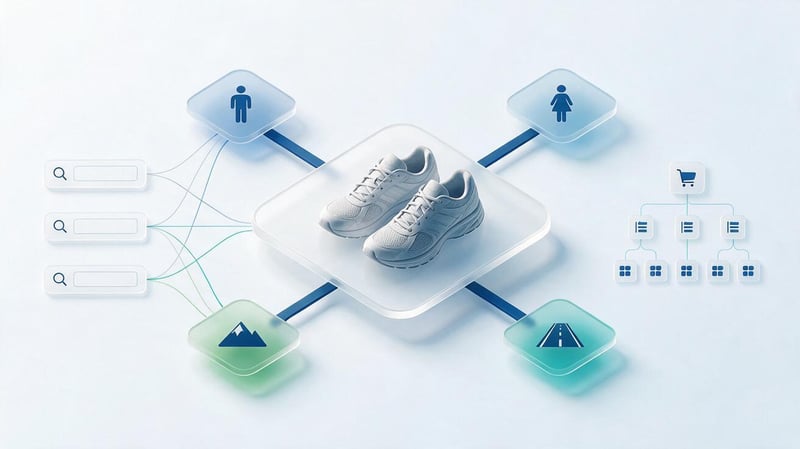
An online store typically requires more detailed semantics than a small service website. Customers search for products by category, brand, size, specification, purpose, and compatibility, so a single broad search term rarely covers the entire product range.
Let's look at the example of the semantic core of an online sports shoe store. The store has several main categories, separate lines for men and women, and a blog with recommendations on choosing equipment.
Initial keywords of the online store
First, a list of keywords is compiled that reflect the key products and needs of buyers. For athletic shoes, these categories would include running shoes, trail shoes, asphalt shoes, and running shoes for different categories of buyers.
The original list might look like this:
- buy running shoes and check prices on models for regular training;
- Women's running shoes and suitable shoes for beginners;
- Men's running shoes for asphalt and gym training;
- trail running shoes and cross-country running shoes;
- running shoes with cushioning and models for long distances;
- How to choose running shoes and select the correct shoe size.
These areas are expanded using Google suggestions, existing website data, and competitor analysis. The resulting keywords are then tested for frequency, relevance to the product range, and search intent.
Even at the data collection stage, it's clear that the queries are heterogeneous. Some require catalog pages with products and filters, while others are suitable for articles where buyers can receive recommendations before choosing a model.
An example of the distribution of requests by categories and subcategories
After semantic cleansing, queries are grouped into thematic groups. This takes into account the actual product structure and search results, as similar words don't always imply the same intent.
An example of a finished distribution looks like this:
| Cluster | Example queries | Page type | URL example |
|---|---|---|---|
| Running shoes | buy running shoes, running shoes price | Category | /running-shoes/ |
| Women's running shoes | women's running shoes, buy women's running shoes | Subcategory | /running-shoes/women/ |
| Men's running shoes | men's running shoes | Subcategory | /running-shoes/men/ |
| Trail shoes | buy trail running shoes, trail running shoes | Subcategory | /trail-running-shoes/ |
| Shoes for asphalt | running shoes for asphalt | Possible landing | /running-shoes/road/ |
| Choosing shoes | how to choose running shoes | Article | /blog/how-to-choose-running-shoes/ |
| Shoe care | caring for running shoes | Article | /blog/running-shoes-care/ |
The provided URLs are provisional and illustrate a possible catalog organization. Before implementation, you should check whether such pages exist, whether there are enough products, and whether the selected groups overlap with other landing pages.
If a store only offers two models of asphalt footwear, a separate category may be of no use to customers. Sometimes a filter within the general catalog or a separate information block on an existing page is sufficient.
When to create a separate filter page?
A separate indexed filter page is worth considering when there is a distinct search demand, a suitable product range, and a clear distinction from the parent category. For example, users may regularly search for sneakers with a specific purpose or surface type.
The next step is to check the search results for relevant queries. If Google shows predominantly specialized categories and the store offers a sufficient selection of products, creating a separate landing page may be worthwhile.
Moreover, filter combinations can create a multitude of technical URLs. Pages that differ only in sorting order, service parameters, or minor characteristics often duplicate the main category.
For such URLs, it's necessary to define indexing, canonical, and internal linking rules in advance. The mere presence of a keyword in the table doesn't necessarily mean a new page needs to be opened for it.
How to use a ready-made core for catalog structure?
After assigning clusters, you can build a tree of categories and subcategories. This helps you see the catalog's depth, evaluate navigation ease, and identify sections that haven't yet been assigned search queries.
For the online store in question, the following structure is possible:
- Running shoes: General category with key commercial queries and links to men's and women's models.
- Women's running shoes: subcategory with the corresponding assortment, characteristics and selection options.
- Men's running shoes: a separate subcategory if the products and search results confirm the need for separation.
- Asphalt running shoes: potential landing after checking demand and intersection with other groups.
- Trail running shoes: A section of trail footwear with relevant models and specifications.
- Blog: Articles on choosing the right size, shoe features, care, and preparing for training.
This diagram shows which pages should be higher in the hierarchy and where it makes sense to place internal links. For example, an article about choosing running shoes could link to the relevant category and specific types of shoes.
For large stores, brands, sizes, materials, seasonality, and other characteristics are added to the map. Each additional section is assessed for demand, usefulness, and the risk of creating multiple pages with the same purpose.
An example of a semantic core for a services website

On a service website, the semantics are typically built around specific services, customer problems, and the service region. The influence of geography is particularly noticeable here: a user might search for the same service by city name, district, or the query “near me”.
Let's look at a company that specializes in dry cleaning upholstered furniture in Kyiv. They accept orders for sofas, armchairs, and mattresses, make home visits, and publish information on furniture care.
An example of grouping commercial and geo-dependent queries
It's best to distribute initial queries based on the nature of the service and user requirements. For example, someone seeking mattress dry cleaning expects to see a description of this specific service, its cost, and the terms of service.
The following groups can be distinguished in the educational semantic core:
| Search query | Cluster | Estimated page |
|---|---|---|
| sofa dry cleaning in Kyiv | Sofa dry cleaning | Service |
| sofa dry cleaning price | Sofa dry cleaning | Same service |
| mattress dry cleaning in Kyiv | Mattress dry cleaning | Separate service |
| chair dry cleaning in Kyiv | Dry cleaning of armchairs | Service or section |
| upholstered furniture dry cleaning at home | Furniture dry cleaning | Basic service |
| how long does a sofa take to dry after dry cleaning | Post-cleaning care | FAQ or article |
| how to remove odor from a sofa | Odor removal | Article or service |
The decision to create separate pages should be made after analyzing the search results. Some queries may relate to the same service, especially if the range of services and terms of performance are virtually identical.
Commercial sections should include a description of the procedure, on-site conditions, pricing or pricing calculations, photographs of completed work, and how to submit an order. Informational materials can also explain the specifics of cleaning and preparing furniture.
How to take into account cities, regions and languages?
For local businesses, the region of promotion influences the selection of queries and the composition of search results. The phrases “sofa dry cleaning Kyiv” and “sofa dry cleaning Pozniaky” are related in meaning, but may have different competitive environments and page requirements.
Creating a separate landing page for each city district without testing demand is not recommended. If a company operates throughout Kyiv, a single, strong service page with clear information about the geographic reach is sometimes sufficient.
In Ukraine, Russian-language and Ukrainian-language queries need to be addressed separately. For example, “химчистка дивана Киев” and “хімчистка дивана Київ” have similar meanings, but their search volume and search results may differ.
Each language version of the website requires its own Title, Description, H1, text, and target URLs. Hreflang settings link the corresponding page versions, and canonical should point to the correct canonical URL for the selected language.
An example of a semantic core for an informational article

For an individual article, the semantic core is usually smaller than for an online store category. However, selecting keywords requires the same careful examination of user intent and search results.
Let's look at an article on checking a website's indexing in Google. The reader wants to know whether a page is indexed, what tools can be used to check this, and what to do if a problem is detected.
What queries can be combined into one article?
Queries related to checking indexation status can be tentatively grouped together. They offer a common, practical answer, although the wording of the questions and the terminology used vary.
An example of the semantic core of an article:
| Query | User intent | Article element |
|---|---|---|
| how to check website indexing | Get instructions | Main theme |
| checking the indexing of website pages | Find out the verification methods | H2 |
| how to know if a page is indexed | Check a specific URL | H3 |
| URL verification in Google | Use Google tools | H3 |
| the page is not indexed by Google | Find the cause of the problem | H2 or a separate article |
| how to speed up page indexing | Find out available actions | H3 |
| Google site indexing operator | Check for results | H3 |
This set of keywords can be used to build the content, but it's advisable to confirm the cluster boundaries using actual search results. For example, queries about the reasons for non-indexing may require a separate, detailed guide.
When writing an article, it's more important to provide a complete answer than to group each keyword into a separate heading. If multiple queries describe the same action, they can be covered in a single, comprehensive section.
How to compose H1, H2 and H3 based on cluster?
Start by choosing the primary search intent and the H1 heading. For this group, the heading “How to check a website's indexing in Google?” is appropriate, as it directly answers the user's query.
Next, they identify practical issues that need to be addressed step by step. The structure may include checking the page through Google Search Console, alternative evaluation methods, and actions to take when indexing issues arise.
Possible distribution:
| Level | Headline | What to reveal |
|---|---|---|
| H1 | How to check website indexing in Google? | The main task |
| H2 | How to check a page using Google Search Console? | Step-by-step actions |
| H3 | What data does URL inspection show? | Interpretation of the result |
| H2 | How to check if a page is listed in Google search? | Additional methods |
| H3 | How accurate is the site operator? | Verification limitations |
| H2 | Why might a page be missing from the index? | Main reasons |
Queries should be relevant to specific sections and appear naturally in explanations. Individual semantic words can be used in text, tables, and captions if they help explain the topic.
Technical information should be verified using Google's current tools. For example, the the site: operator may help find individual pages, but its results are not suitable for accurately counting all indexed URLs.
When do you need two articles instead of one?
Separation makes sense when related queries involve different tasks and significantly different content. A user who wants to check a single page expects to receive short, practical instructions.
Anyone facing the problem of mass de-indexing pages needs to diagnose robots.txt, canonical, redirects, technical errors, and content issues. This topic may require a separate, extensive article.
The final decision is made after comparing search results. If different documents are regularly ranked for the two groups, it's worth considering individual articles with mutual links.
If requests are served primarily by the same pages, artificially separating them can lead to cannibalization. In such a situation, it's more convenient to address additional issues within a single guide.
An example of creating a semantic core from scratch

To independently collect semantic data, you'll need to define a topic, find search queries, refine the list, group phrases, and assign landing pages. This workflow is suitable for most projects, although the tools and depth of analysis may vary.
Let's continue with the example of the online athletic shoe store. Let's assume the website already exists, but some categories aren't receiving organic traffic, and the informational articles aren't yet linked to the product sections.
Step 1: Determine the topic, product range, and search region
Before collecting queries, it's necessary to study what products are actually sold, who buys them, and what problems the product range solves. For a sports shoe store, you need to categorize products by purpose, audience, brand, and characteristics.
Next, they specify the country and language of the promotion, and if necessary, select individual cities. Ukrainian shoppers' search queries may differ from those popular in other countries, even if they're talking about the same products.
It's helpful to review your catalog structure and sales data in advance. This will help you identify categories with high commercial priority and avoid wasting time on the semantics of missing products.
This step results in a list of key categories, which is used to search for keywords. For each group, it's advisable to record the corresponding product range and existing website section.
Step 2: Collect basic keywords
Target queries are short phrases that identify key products or services. For our example, “running shoes”, “trail running shoes”, “women's athletic shoes”, and other product group names would work.
The next step is to add common keywords: buy, price, for men, for women, for asphalt, for training. These help identify long-tail search queries, which sometimes more accurately reflect the buyer's intent.
At this stage, it's helpful to review the categories of major competitors and the manufacturers' own definitions. The names of technologies, shoe types, and characteristics often suggest additional areas of research.
It's best to keep the original list without first removing rare phrases. Some queries may be useful after reviewing the search results, but cleaning them too early can exclude small, commercially significant groups.
Step 3: Expand your list through Google and competitors

To expand your keywords, you can use Google Keyword Planner, search bar suggestions, related questions, and specialized SEO services. If your site is already receiving impressions, the Google Search Console performance report will be a useful resource.
In Search Console, you can see the queries for which pages appeared in search results, and evaluate clicks, impressions, CTR, and average rankings. This data helps you identify existing demand and identify pages with potential for improvement.
Serpstat, Ahrefs, and similar tools are great for researching competitors' keywords. Of particular interest are phrases that rank other sites high, but which our project doesn't yet have a suitable page for.
It's important to consider the limitations of each source. For example, the competition score in Google Keyword Planner is based on ads and doesn't equate to the difficulty of organic promotion.
For selected queries, it's a good idea to check the actual search results. This shows what types of pages Google considers appropriate for users in a particular region.
Step 4: Remove duplicates and irrelevant queries
After expanding the list, duplicates, phrases with incorrect intent, and queries that don't match the product range typically appear. These need to be separated from useful semantics before further grouping.
If a store only sells new shoes, queries about buying used sneakers may be irrelevant. Similarly, queries about repairs, rentals, and free pickups should be checked.
Table filters, duplicate detection, and stopword lists are used for cleaning. It's best to exclude expressions based on their meaning, as the same word can appear in both inappropriate and useful queries.
Don't automatically remove all phrases with a zero search volume. Some long queries rarely show up in tool statistics, but they accurately describe the product and can attract interested buyers.
Step 5. Clustering search queries

Clustering combines related phrases into groups intended for one or more related pages. You can first perform semantic grouping and then test it against the intersection of search results.
For example, the phrases “buy running shoes” and “running shoes price” are presumably classified as general commercial searches. The query “how to choose running shoes” is better placed in the information cluster.
Automatic SERP clustering compares search results and combines queries according to specified intersection rules. The closer the sets of ranking documents are, the more reason to consider the queries together.
However, the resulting groups require specialist review, especially for mixed intent. Search results can contain stores, reviews, and marketplaces simultaneously, so the mechanical result isn't always suitable for a specific website's structure.
What is the difference between manual and automatic clustering?
Manual grouping is convenient for a small number of queries, when a specialist has a good understanding of the product range and can check each group. It helps account for the project's commercial specifics, which aren't always visible to the clustering algorithm.
The main drawback of manual clustering is the time required and the potential for subjective decisions. Two specialists sometimes categorize similar phrases differently, especially if a query allows for multiple search intents.
Automatic tools speed up the processing of large lists and allow for the use of uniform criteria for comparing search results. Grouping settings, region, and analysis depth influence the resulting clusters.
For large projects, it makes sense to combine both approaches. First, process the bulk of requests automatically, then manually check for commercially important groups, contentious pages, and potential cannibalization.
Step 6: Assign landing pages and priorities
After clustering, each group is assigned a suitable website page. If such a page exists, its content, title, H1, product range, internal links, and relevance to search intent are checked.
If a suitable URL isn't available, the need for a new section is assessed. For example, a separate category for women's running shoes might be useful if there's sufficient selection and proven commercial demand.
It's advisable to prioritize each cluster, taking into account frequency, sales potential, competition, the current state of the site, and the difficulty of implementing the necessary changes.
Initially, they typically work with areas that have clear commercial value and can be improved without a major restructuring of the project. The remaining clusters are assigned according to the catalog and content development plan.
Step 7. Export the finished core to Excel
After checking the clusters, the table must be formatted for further work. Search queries, groups, intents, target URLs, priorities, and page comments are added to the final file.
For a large website, it's worth maintaining separate tabs for the source data, cleaned queries, and the relevance map. This will facilitate re-checking the semantics and allow you to reconstruct the reasons for decisions made.
Before file transfer, duplicates, empty fields, and clusters without landing pages are checked. Particular attention is paid to URLs assigned to multiple groups with different search intents.
After this, the semantic core can be used to prepare technical specifications, plan new categories, and monitor optimization. Whenever the site structure changes, the table should also be updated to ensure the data remains consistent.
How to check the correctness of the finished semantic core?

The accuracy of a semantic core is determined by the quality of queries, the logic of their grouping, and their relevance to the actual website. Even a carefully formatted Excel spreadsheet can contain errors that can lead to unnecessary pages or improper content distribution.
It's advisable to test the completed core before development and mass writing begins. Correcting the structure at this stage usually requires less work than migrating already published pages and subsequently setting up redirects.
Signs of a high-quality semantic core
When checking, first assess the completeness of the topic's coverage. The table should include key products or services, important characteristics, and queries that meet the actual needs of the target audience.
Next, they check the distribution of keywords across intents and pages. Commercial groups should lead to appropriate landing pages, and informational queries should receive meaningful answers in articles or help sections.
A useful checklist includes several questions:
- Completeness: Are all important products, services, and business areas represented in the collected semantics?
- Relevance: Do search queries correspond to the company's actual product range and capabilities?
- Intent: Does the purpose of the selected page match the user's expectations?
- Clustering: Is the combination of queries confirmed by the topic and search results?
- Geography: Are the country, region, and language specified correctly for each data set?
- Relevance map: Are the landing pages assigned and is there any unnecessary cluster overlap?
- Freshness: Are the frequency sources and dates of the last checks saved?
After checking, it's advisable to manually review the most important commercial groups. This is where errors can have the greatest impact on the catalog structure and landing page quality.
Lead SEO specialist — Gennady
In my practice, I regularly encounter tables with thousands of search queries for which it's impossible to immediately create an optimization plan. Most often, the problem stems from a lack of clear clustering and distribution of phrases across pages.
When I check a completed semantic core, I first look at search intent and the relevance map. I need to understand what need each group addresses, which page should receive traffic from it, and what changes will be required on the site. I evaluate the number of phrases collected after this check.
Common mistakes in ready-made semantic examples
One common mistake is creating a separate page for each search term. This results in similar sections that answer the same queries and compete with each other in search results.
Another problem is related to improper intent separation. For example, the queries “buy sneakers” and “how to choose sneakers” may relate to the same topic, but typically require different content and page elements.
The following errors also occur:
- Using outdated frequencies without checking region, period and data source.
- Mixing Ukrainian and Russian queries without separate development of language versions.
- Removal of all low-frequency phrases without assessing their commercial purpose.
- Grouping solely by word matches, without analyzing search results.
- The lack of target URLs makes the finished spreadsheet poorly suited for implementation.
It's best to correct such errors before preparing the content. Otherwise, the copywriter may receive several nearly identical technical specifications, and the developer may be tasked with creating sections that users don't need.
How to use a ready-made semantic core for SEO promotion?

After collecting semantics, work begins on the structure, content, and internal links. Pre-defined query groups help determine which pages need to be optimized, what materials should be prepared, and where there are gaps in covering search demand.
For ease of implementation, it's helpful to link the table to a task plan. It specifies the assignee, priority, status, and expected outcome, ensuring the semantic core remains relevant even when the website changes.
Landing page creation and optimization
Each landing page is assigned a primary topic cluster and associated queries. This data is used to check whether the title, description, H1, section structure, and content match the user's search intent.
For a commercial category, product selection, filters, delivery information, purchase terms, and product specifications may be required. For a service page, a detailed description of the work, terms of performance, pricing, and a convenient contact method are more important.
Keywords should be used naturally and meaningfully. Repeating the same phrases in each heading hinders readability and is no substitute for fully exploring the topic.
If the desired page already exists, first evaluate the feasibility of improving it. Creating a new URL is only justified if the current section fails to satisfy a specific search intent.
Content plan and internal linking
Information clusters help create a content plan related to key commercial areas. For example, an online running shoe store might publish articles on sizing, cushioning types, and training tips.
From such materials, it's logical to direct readers to relevant product categories. Links should complement the explanation and lead to pages where users will find the desired models or services.
A relevance map allows you to identify connections between categories, subcategories, and articles in advance. It also helps identify pages that receive virtually no internal links and remain difficult to access within the site structure.
When preparing anchor text, use clear wording that matches the content of the landing page. Avoid repeating the same exact keyword in every link if the text can be written more naturally.
Updating the semantic core
Search demand changes along with product range, seasonality, customer behavior, and the introduction of new products. Therefore, the semantic core must be revised whenever there are significant changes in business or SEO results.
For an online store, the reason might be the launch of a new category, brand expansion, or a change in sales priorities. For a service website, it might be the introduction of a new service area, a change in service region, or the launch of an additional language.
When reviewing the core, it's helpful to compare old and new Google Search Console data, check rankings, and look for queries that have started generating impressions. Based on these results, you can decide which groups need to be expanded or reassigned.
There's no universal update schedule. A large store with a constantly changing product range may require regular checks, while a small corporate website may require a revision following significant changes in services and demand.
A sample of a completed semantic core helps you understand how to organize keywords, categorize them into thematic groups, and link them to specific website pages. For practical implementation, you should also check search volume, search intent, region, and the relevance of the queries to the actual product range.
Start with the completed sample and gradually replace the training data with your own queries. After verifying the clusters, the table can be used to build the site structure, prepare content assignments, and create internal links.
Download the Excel template for the semantic core and fill it out for your project. If you need semantic keyword collection with competitor analysis, clustering, and URL distribution, please contact the Seo-Gen specialists.


