DataLayer in Google Tag Manager: how it works and how to test it


Google Tag Manager can retrieve information about clicks, pageviews, and user actions directly from the website interface. This approach is often insufficient for orders, leads, products, logins, and other business events, as the required values may be missing from the HTML or may change with the layout.
DataLayer solves this problem by structured data transfer from the website to the tagging system. The developer sends an event and its parameters, Google Tag Manager receives the values, applies triggers, and transmits the prepared data to Google Analytics 4, Google Ads, or another connected system.
What is DataLayer in Google Tag Manager?
The DataLayer is a global JavaScript array where a website stores events and associated parameters. It can be used to pass page type, product ID, order value, currency, form data, user parameters, and other values needed for web analytics.
The typical workflow looks like this: a website generates an event, writes it to the DataLayer, and then Google Tag Manager reads the new data. Then, a suitable trigger fires a tag, which then passes the information to GA4 or another system. This scheme decouples analytics from specific interface elements.
Why do we need a data layer?
The data layer is useful in situations where analytics requires information that isn't visible on the page. For example, after placing an order, you can pass the transaction_id, total price, currency, and an array of purchased items, even though most of this data isn't visible to the user.
The DataLayer also helps maintain a stable analytics schema after a redesign. If the developer changes CSS classes, block order, or button appearance, the generate_lead event will continue to be transmitted using the existing contract, so the GTM container settings won't need to be reworked along with the interface.
How is DataLayer different from data in DOM?
The DOM describes the page structure, its elements, attributes, and content, so Google Tag Manager can find the required values through selectors or built-in variables. This approach is suitable for simple clicks, views, and elements that are consistently present in the HTML.
The DataLayer stores specially prepared data regardless of the page's visual structure. The analyst receives a pre-agreed product_id or form_id value, rather than trying to extract it from button text. This tracking is significantly less likely to break when the design changes.
Answers to your questions
What is DataLayer in Google Tag Manager?
DataLayer is a global JavaScript array through which a website passes structured events and parameters to Google Tag Manager. It can contain data about forms, products, orders, authorizations, and other actions, which are then used by variables, triggers, and tags.
This method reduces analytics' dependence on the page's HTML markup. If the interface changes, the agreed-upon event and parameter names can remain the same, so the GTM container continues to receive the expected values.
How to view DataLayer in Chrome?
Open Chrome DevTools, switch to the Console tab, and run the window.dataLayer command. The browser will display the current array with all messages added after the page loaded and user actions performed.
To find a specific event, you can use array filtering, for example, dataLayer.filter(item => item.event === 'purchase'). Then, expand the retrieved object and check the parameter names, values, and data types.
How is gtag different from dataLayer.push()?
The gtag() function adds Google tag commands to the same dataLayer array, but uses the argument format adopted by Google products. dataLayer.push() is more commonly used for custom objects and events, which are then processed by the Google Tag Manager container.
Both approaches can coexist on the same site if the setup is deliberately configured. Sending the same event simultaneously through GTM and direct gtag creates duplicates, so the sources of analytics queries need to be monitored.
Do I need to create a DataLayer manually?
When installing GTM, the default code already uses the dataLayer, but the site must send its own business events separately. The developer needs to add dataLayer.push() in the application locations where actions required for analytics occur.
The number of such events depends on the task. A simple website may only need a few key actions, while an online store typically requires a full-fledged ecommerce schema with products, a shopping cart, checkout, and purchase.
Why isn't dataLayer.push() showing up in Google Analytics?
The mere fact that an object appears in the DataLayer doesn't automatically send anything to GA4. Google Tag Manager must see the event, fire the appropriate trigger, execute the GA4 Event tag, and generate a request with the correct parameters.
If an event is present in Chrome but not in DebugView, check Preview, Tags Fired, variables, and the network request. This sequence helps determine where exactly the data transfer was interrupted.
Can I use DataLayer without Google Tag Manager?
Yes, the DataLayer is a regular JavaScript structure and can technically be used without a GTM container. Another script can read array elements, respond to new entries, and use them for its own logic.
In practice, the standard name dataLayer is most often found alongside Google Tag Manager or Google tag. If GTM is not available, the developer must independently define the rules for message processing and subsequent data transfer.
Is it possible to change the name of the dataLayer?
Google Tag Manager supports a different data layer name if the container is configured accordingly. This option is sometimes used for projects with specific technical requirements, but the standard name is easier to maintain and troubleshoot.
If the name is changed, the standard window.dataLayer command in Chrome will no longer display the required array. Analysts and developers need to know the new name, otherwise diagnostics may begin with the erroneous conclusion that the data layer is missing.
Where is it better to test DataLayer – in Chrome or GTM Preview?
Chrome Console shows what the site sent to the data layer, making it a convenient starting point for technical testing. GTM Preview shows the next step: how the container saw the event, what values the variables received, and which tags fired.
For a complete diagnosis, you need both tools. Afterwards, open GA4 DebugView and ensure that the target system received an event with the same parameters passed on the page.
How does DataLayer work?
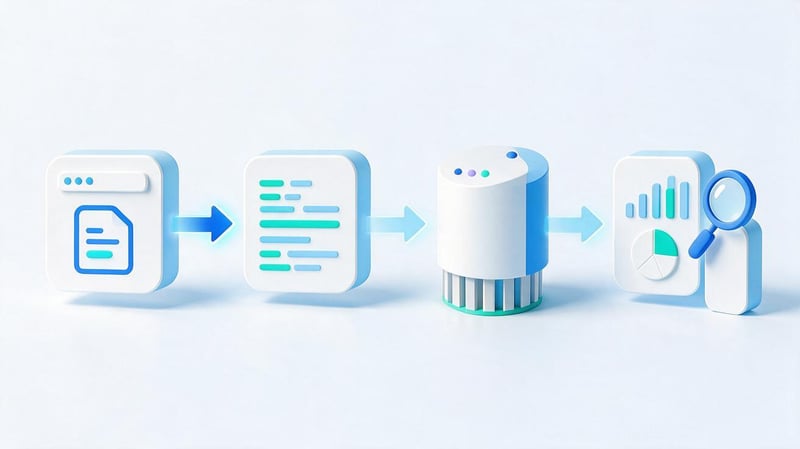
In the browser, the data layer is typically created as a property of the global object window. After initialization, the site adds new messages as the page loads and user interactions occur. Google Tag Manager tracks this sequence and processes messages in the order they appear.
The basic architecture looks like this:
Website → window.dataLayer → Google Tag Manager → GA4 / Google Ads
You can pass regular values, nested objects, and arrays. For most practical analytics tasks, events are especially important because they often trigger corresponding triggers within GTM.
How is window.dataLayer created?
Before loading the container, it is common to use safe array initialization:
window.dataLayer = window.dataLayer || [];
The first part accesses the existing window.dataLayer, while the second creates an empty array only if it doesn't already exist. This approach preserves values that may have been added previously and avoids unnecessary data layer re-creation.
If some parameters need to be available immediately when Google Tag Manager starts, they are passed before the container loads. For example, a site might pre-add a page category or user type, after which GTM will see these values when processing the first events.
How does dataLayer.push() work?
The dataLayer.push() method adds a new message to an existing array. It is used to send events and parameters after clicks, form submissions, authorizations, adding items to cart, purchases, and other actions that need to be recorded in analytics.
dataLayer.push({
  event: 'generate_lead',
  form_id: 'contact'
});
After the code executes, the object remains in the data layer, and GTM receives a generate_lead event. Repeating the dataLayer = [] command after loading the container can clear the previously created structure, so the existing array should not be redefined without a technical reason.
What does a DataLayer object consist of?
A DataLayer message is typically constructed from key-value pairs. The key defines the parameter name, and the value contains the specific data. A single object can contain strings, numbers, product arrays, and nested structures, which are then used by GTM variables.
{
  event: 'purchase',
  value: 1500,
  currency: 'UAH'
}
Here, event denotes a purchase event, value contains the numeric price, and currency conveys the currency code. For complex e-commerce, transaction_id, items, and other parameters required by the GA4 schema are added to this object.
How does Google Tag Manager handle DataLayer?

Google Tag Manager processes messages that appear in the data layer sequentially. If an object contains an event key, the container can match it with a custom event and check the conditions of the corresponding triggers. Tags that meet the specified rules are then fired.
The order of transmission matters. If the required parameter reaches the DataLayer after the tag has fired, GTM may send an empty or outdated value. Therefore, when setting up analytics, they check not only the presence of data but also the moment it appeared relative to the event.
What is a data layer variable in GTM?
A Data Layer Variable reads a specific value from the data layer and makes it available within the container. For example, a website might transmit a purchase event along with the transaction ID and total price, which can then be substituted into GA4 Event parameters.
dataLayer.push({
  event: 'purchase',
  transaction_id: '12345',
  value: 2500
});
In GTM, you can create transaction_id and value variables for such an object. These are then used in tag settings, passed to GA4, and verified in Preview Mode. The process is as follows: DataLayer → Variables → Trigger → Tag.
What is a Custom Event in Google Tag Manager?
A Custom Event is used when a site independently sends a named event through the data layer. For example, after a form is successfully submitted, the developer calls dataLayer.push() and records the form_submit event, and GTM expects this name in the custom trigger.
dataLayer.push({
  event: 'form_submit'
});
The DataLayer name and the Custom Event value must match, including case. If the developer sends form_submit and the trigger expects formSubmit, the event will appear in the array, but the required tag will not fire. It's easy to detect such discrepancies using Tag Assistant.
How are gtag and DataLayer related?
The gtag datalayer query often appears when parsing Google Analytics 4 or Google tag code, as both constructs are used side by side. The gtag() function operates through the same global dataLayer array, but passes commands to it in the format expected by Google products.
When using GTM, analysts often work with standard dataLayer.push() objects, as this structure is convenient for arbitrary business events. When directly installing a Google tag on a website, the gtag('event', ...) syntax is more common, although the specific architecture depends on the project.
What does the gtag() function do?

The standard gtag() function is typically declared as follows:
window.dataLayer = window.dataLayer || [];

function gtag() {
  dataLayer.push(arguments);
}
When a site calls gtag(), the passed arguments are added to the dataLayer. For example, a configuration command or a GA4 event is first added to the array, after which the corresponding Google code processes the record. Therefore, gtag and the data layer are technically linked.
For a developer, the difference is noticeable in the format. Direct dataLayer.push() typically passes an object with arbitrary keys, while gtag() uses the argument sequence adopted by Google tag. When troubleshooting, it's important to consider the specific implementation method.
What is the difference between gtag() and dataLayer.push()?
Both constructs use the DataLayer, but are used in different scenarios. gtag() is targeted at Google tag commands and related Google products, while dataLayer.push() is convenient as a general contract between the application, GTM, and analytics systems.
| Parameter | gtag() | dataLayer.push() |
|---|---|---|
| Main application | Google tag and Google services | GTM and your own data schema |
| Data format | gtag commands and arguments | Objects, arrays, and parameters |
| Custom events | Supported | Supported |
| Flexibility of structure | Depends on Google tag syntax | Suitable for your own scheme |
| Typical scenario | Direct submission to Google products | Data transfer via GTM |
When choosing a data transfer method, consider the existing site architecture. Mixing different methods without a common framework often creates duplicate events, so first define a single data source and sending sequence.
Can I use gtag and Google Tag Manager at the same time?
Technically, a single site can contain Google Tag Manager and direct gtag() calls. With this setup, it's important to control which event each mechanism sends; otherwise, the same user action could be reported twice in GA4, skewing the conversion count.
A common example occurs with the purchase event: the developer calls it via gtag(), and the GTM container simultaneously dispatches a second purchase event after the purchase appears in the DataLayer. During auditing, Network, DebugView, and Preview are checked to determine the source of each request.
How to view DataLayer in Chrome?

The datalayer chrome query typically involves a quick inspection of the data layer's contents directly in the browser. This diagnostic doesn't require changing the site's code or accessing the container's settings, as the global array can be viewed using Chrome's standard developer tools.
Checking via a browser first helps ensure that the site has actually sent the required information. If the event is missing from window.dataLayer, further troubleshooting within GTM will usually be fruitless until the developer fixes the data transfer on the site's end.
How to open DataLayer using Chrome DevTools?
Open the desired page in Google Chrome, launch Chrome DevTools via F12 or the Inspect option, and switch to the Console tab. Once the page loads, enter the following command and confirm execution by pressing Enter:
window.dataLayerAn array will appear in the console, and you can expand its elements one by one. The short dataLayer command works similarly if the global variable is accessible under a standard name. Inside, you need to search for the required event, parameters, and values that the site should transmit.
How to find the desired event in DataLayer?
On pages with a large number of events, the array quickly grows, making manually browsing through dozens of elements inconvenient. In Chrome Console, you can filter entries by event name to retrieve only the relevant objects.
dataLayer.filter(item => item.event === 'purchase')For a form, a similar command might search for generate_lead, and for a cart, for add_to_cart. After filtering, it's worth expanding the retrieved object and inspecting the event parameters. Undefined values, empty strings, and unexpected data types usually indicate an implementation issue.
Why might an event not be in the Chrome Console?
An event appears in the DataLayer only after the corresponding code is executed, so it should be checked after the desired action. For example, purchase is typically sent after a successful order, and generate_lead is sent after a confirmed form submission.
The reasons for the absence of an event can be different:
- the required user action has not yet occurred or has ended with an error;
- JavaScript code with dataLayer.push() failed to execute due to an error;
- the site uses a different data layer name instead of the default dataLayer;
- the array was recreated after the container was loaded;
- The event is sent before the transition to another page and does not have time to be processed.
After checking the list, you should repeat the user scenario and review the array again. If the event doesn't appear, the problem should be located in the site code or the logic that should trigger the corresponding push().
How to test DataLayer via GTM Preview?

Chrome displays the array contents on the site's side, and GTM Preview helps you see how the container processed the messages. To diagnose this, open Tag Assistant, connect the page being tested, and perform the action that should trigger the desired event.
The left side of the Preview displays the event sequence, while the details include the Data Layer, Variables, and triggered tags. This view helps identify situations where an object is present in the browser, but GTM reads the wrong key or fails to meet the trigger conditions.
What to check in the Data Layer tab?
First, you need to ensure that the event occurred at the correct time and contains the expected parameters. Then, it's worth comparing the actual keys with the agreed-upon Data Layer Specification schema, as one extra letter in the name can leave a variable empty.
The check usually includes several points:
- the event name matches the Custom Event setting;
- the required values appeared before the required tag was triggered;
- value is passed as a number if the system expects a numeric parameter;
- currency contains the correct currency code;
- one user action does not create multiple identical events.
After checking the Data Layer, move on to Variables and look at the values for the same event. This procedure reduces the time needed to find errors, as it's immediately clear at what point the data no longer matches the expected schema.
How do I check if the tag worked?
For the required event, Tag Assistant displays the Tags Fired and Tags Not Fired sections. If the tag is in the first group, the container has met its conditions. If it is in the second group, open the details and check which trigger condition was false.
Additionally, it's worth opening Variables and verifying that the Data Layer Variable has received the expected value. Sometimes an event fires a tag correctly, but one of the parameters remains empty due to an invalid path to the nested object. This tag technically fires, but sends incomplete data.
How to check an event in GA4 DebugView?
After checking the DataLayer and container, you need to ensure that the event has reached Google Analytics 4. In debug mode, GA4 displays incoming events and their parameters, so you can verify the event name, value, currency, and other transferred data.
A convenient diagnostic sequence looks like this:
Chrome → DataLayer → GTM Preview → GA4 DebugView
Lead SEO specialist — Gennady
I first check the DataLayer using window.dataLayer in Chrome and ensure the site has passed the required event along with its parameters. Then I check GTM Preview and GA4 DebugView. This quickly reveals where the error occurred: in the site code, container settings, or when sending data to the analytics system.
How to pass events via DataLayer?

It's best to agree on event names and parameter sets before implementing analytics. The developer needs a clear event dictionary, and the analyst needs stable values that don't change with each interface update. For typical actions, GA4 recommended events can be used as a guide.
Form, click, and authorization can be transmitted as separate objects. Only the parameters actually needed for analysis, advertising, or diagnostics are added to each event. Excessive data collection complicates support and increases the risk of transmitting unnecessary information.
Submitting the form
For a successful form submission, you can use the recommended generate_lead event and add the form ID. This event should be called after a confirmed submission, not on a simple button click, as the user may get a validation error.
dataLayer.push({
  event: 'generate_lead',
  form_id: 'callback'
});
The form_id parameter helps differentiate between forms for consultations, callbacks, appointments, and orders. If analytics is needed to compare their performance, identifiers should be fixed in the specification and preserved after design changes.
Button click
Tracking every click via the DataLayer is usually unnecessary, as GTM can handle standard click triggers. A separate button_click makes sense when the action is tied to business logic and requires a stable parameter that can't be reliably retrieved from the DOM.
dataLayer.push({
  event: 'button_click',
  button_name: 'consultation'
});
It's best to pass the button name as a technical value that's independent of the interface text. If the editor changes the text from “Get a consultation” to “Contact a specialist”, the analytical value consultation will remain the same.
User authorization
For a successful login, you can pass the recommended login event and specify the authorization method. This parameter allows you to compare email, Google Account, Apple ID, or another method without sharing any personal data about the user.
dataLayer.push({
  event: 'login',
  method: 'email'
});
A plain email address or phone number should not be added to the DataLayer without specific justification and verification of the platform's policies. Technical identifiers and categories that do not reveal personal data are usually sufficient for analytics.
How is DataLayer used in e-commerce?

In online stores, DataLayer transmits information about product views, carts, checkouts, and purchases. GA4 uses standard e-commerce events and expects a specific parameter structure, so the schema must be aligned with the documentation before development begins.
The data layer can pass view_item, add_to_cart, view_cart, begin_checkout, add_payment_info, purchase, and refund. For product events, an items array is used, with separate fields specifying the ID, name, price, quantity, and other characteristics.
What e-commerce events can be transmitted?
Different events are needed at different stages of the funnel. view_item records the product view, add_to_cart records the addition to the cart, begin_checkout records the start of checkout, and purchase confirms the completed transaction after successful payment or another agreed-upon event.
Before publishing, it is worth checking at least the following events:
- view_item passes the view of a specific product card;
- add_to_cart records the addition of the selected product to the cart;
- view_cart shows a view of the current cart contents;
- begin_checkout is passed when the checkout process begins;
- add_payment_info records the addition of payment information;
- purchase is sent after a successful completed purchase;
- refund is used to record the return of a transaction.
The list of events depends on the store and the actual funnel. Transferring unused events just for the sake of completeness doesn't make sense, as analytics should reflect existing user actions.
What does a purchase event look like?
A purchase event typically contains a transaction ID, total price, currency, and an array of products. The transaction_id is especially important for duplicate detection, as a single transaction should not be counted as multiple independent sales.
dataLayer.push({
  event: 'purchase',
  ecommerce: {
    transaction_id: 'T12345',
    value: 2500,
    currency: 'UAH',
    items: [{
      item_id: 'SKU123',
      item_name: 'Product name',
      price: 2500,
      quantity: 1
    }]
  }
});
The value is passed as a number without a currency symbol, and the currency is specified separately using the currency attribute. The items array must correspond to the actual order contents, otherwise GA4 product reports will differ from the overall transaction information.
What parameters are especially important to check?
For a purchase, the transaction_id, value, currency, and items are checked first. Within the product array, the item_id, item_name, price, and quantity are checked, as errors in these fields impact e-commerce reports and product category analysis.
It's best to test using several scenarios: ordering a single item, multiple items, different currencies, and reopening the confirmation page. If the purchase is resubmitted after refreshing the page, sales statistics may be inflated even if the other parameters are structured correctly.
How does DataLayer work on SPA sites?

In React, Vue, Next.js, and other SPAs, transitions between screens often occur without a full document reload. A standard Page View may not automatically trigger this type of navigation, so the app must notify analytics of route or state changes at the appropriate time.
The same logic applies to e-commerce events. Components change within an already loaded page, but old values may remain available in the data model. Therefore, the developer must control the push() sequence and not carry over the parameters of a previous product to a new event.
Why clean up ecommerce before a new event?
Some implementations use object clearing before a new ecommerce event to prevent data from the previous action from being mixed with the new set of parameters. A common approach is as follows:
dataLayer.push({ ecommerce: null });After this, the application sends the next ecommerce object with the updated values. This scheme depends on the specific architecture and version of the container configuration, so it should be verified through the Preview and real test events, rather than automatically applied to every project.
Is there a DataLayer in server-side Google Tag Manager?
Server-side Google Tag Manager works differently than the browser container. The server doesn't have a window object or the familiar window.dataLayer array, because the code runs outside the user's browser. The server container accepts incoming HTTP requests and converts them into internal event data.
In a typical scenario, the browser-based GTM receives data from the website, forms a request, and sends it to the server-side container. The Client then parses the request, server-side tags receive the necessary parameters, and transmit the information to GA4, advertising systems, or other endpoints.
The term “server-side dataLayer” is sometimes used as a simplified description of this process, but the technical structure differs from a typical browser array. When setting it up, you need to separately check the web container, network request, Client, and event data within the server-side GTM.
What are the most common errors when working with DataLayer?

Most problems stem not from the complexity of the array itself, but from inconsistent names, incorrect event sequencing, and duplicate dispatches. Therefore, before implementation, it's helpful to create a Data Layer Specification that specifies the event, parameters, value types, and dispatch time for each action.
After publication, the specification should be used for regression testing of site updates. If the developer changes the name of a key or the timing of the push() call, the error should be detected before incorrect data accumulates in GA4 reports.
Reinitializing the DataLayer
A dangerous error occurs when the code assigns dataLayer = [] again after Google Tag Manager has loaded. This replaces the existing array with a new one, and the container may lose previously passed data or stop receiving messages as expected.
Safe initialization is typically performed once via window.dataLayer = window.dataLayer || []. If a project has multiple independent scripts working with the data layer, each should use the existing array and add new elements via push().
The event is sent too late
Parameters must appear before the tag that uses them. If the event fires first, and the value is added a few milliseconds later in a separate message, the first tag may send an empty value or data from the previous state.
Such errors are easily visible in GTM Preview's event sequence. You need to open the tag's triggering point and view the variables for that specific event. Checking the value at a later stage can create the false impression that the setting is working correctly.
Different names for the same event
Without a common dictionary, the same lead could be called lead, formSubmit, form_submission, or generateLead. For GTM, these are four different events, so a trigger configured for one name will ignore the other variations.
Names should be agreed upon before implementation and used consistently across all pages where the same business action occurs. For events already described in GA4, it's reasonable to use Google's recommended terminology if it matches the actual user action.
Duplicate events
Duplicates occur when a single action is monitored by multiple handlers, two GTM containers, or a direct gtag call along with a tag within GTM. In an SPA, an additional duplicate may occur after component reinitialization when the route changes.
You need to check the number of push()s in the Console, the number of events in the Preview, and the actual network requests. If the user placed an order once, the system should generate the expected number of purchase events, and each additional request requires a separate explanation.
Transfer of personal data
The DataLayer is visible in the browser, so it's not advisable to include email, phone number, full name, and other sensitive data there unless absolutely necessary. Besides the privacy risk, such data could accidentally leak into analytics or advertising systems via universal variables and tags.
It's better to transmit a technical identifier, user category, or action type. The transfer of PII should be separately verified in accordance with the website's requirements, legislation, and the policies of the specific platform receiving the data.
DataLayer Validation Checklist
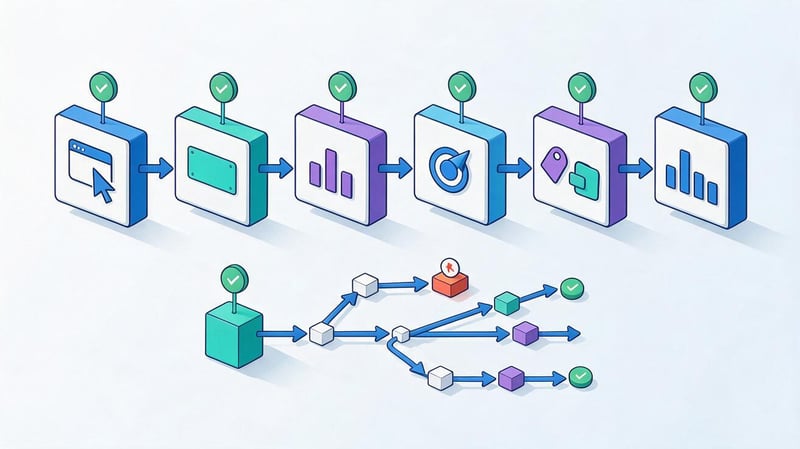
It's convenient to conduct the test sequentially, starting with the browser and ending with the final analytics system. Jumping between stages can lead to a long search for an error within GA4, even though the original event never appeared on the page.
| Check | Expected result |
|---|---|
| window.dataLayer is available | The Console displays an array |
| The required event has appeared | The event name matches the specification |
| The parameters are filled in | No unexpected undefined or empty values |
| GTM received an event | It is displayed in Preview |
| Variables read | Values match the DataLayer |
| The tag fired | It's in Tags Fired |
| GA4 received an event | It is visible in DebugView. |
| There are no duplicates | One action produces the expected number of events |
| No PII | Personal data is not included in the analytics stream |
The verification sequence diagram can be represented as a single chain:
User Action → dataLayer.push() → Custom Event → Trigger → Tag → Request → GA4 DebugView
If a failure is detected at a specific stage, further diagnostics begin with that stage. This approach is faster than randomly checking all settings at once and gives the developer a specific location for correction.
The DataLayer provides a clear way for a website to pass events and parameters to Google Tag Manager, regardless of the interface structure. For stable analytics, it's necessary to define event names in advance, agree on parameters, verify the push() sequence, and test the entire chain from the browser to GA4.
If events in the DataLayer are duplicated, contain empty values, or aren't reaching Google Analytics 4, Seo-Gen specialists will review your website code, Google Tag Manager settings, and data transfer structure. After the audit, you'll receive a specific list of errors and fixes for the developer without having to rebuild your analytics.


